Learn how location metadata attached to photos, posts, routes, check-ins, and app activity helps geographers map human activity, movement, clusters, flows, and privacy risks.
Updated June 5, 2026 · Reviewed by APScore5 Editorial Team
Geotagged data attaches location information to digital content, helping geographers map human activity while evaluating privacy, bias, and representation.
Quick answer
⚡
What Is Geotagged Data in AP Human Geography?
Geotagged data is digital information that includes location metadata, such as latitude and longitude, a place label, or GPS coordinates. In AP Human Geography, geotagged data helps geographers map photos, posts, routes, check-ins, app activity, and movement patterns, but it can also create privacy, bias, and representation problems.
Geotagged data means data with location attached.
Common examples include GPS-tagged photos, social media posts, fitness routes, and ride-share pickups.
Geotagging turns digital activity into mappable geographic evidence.
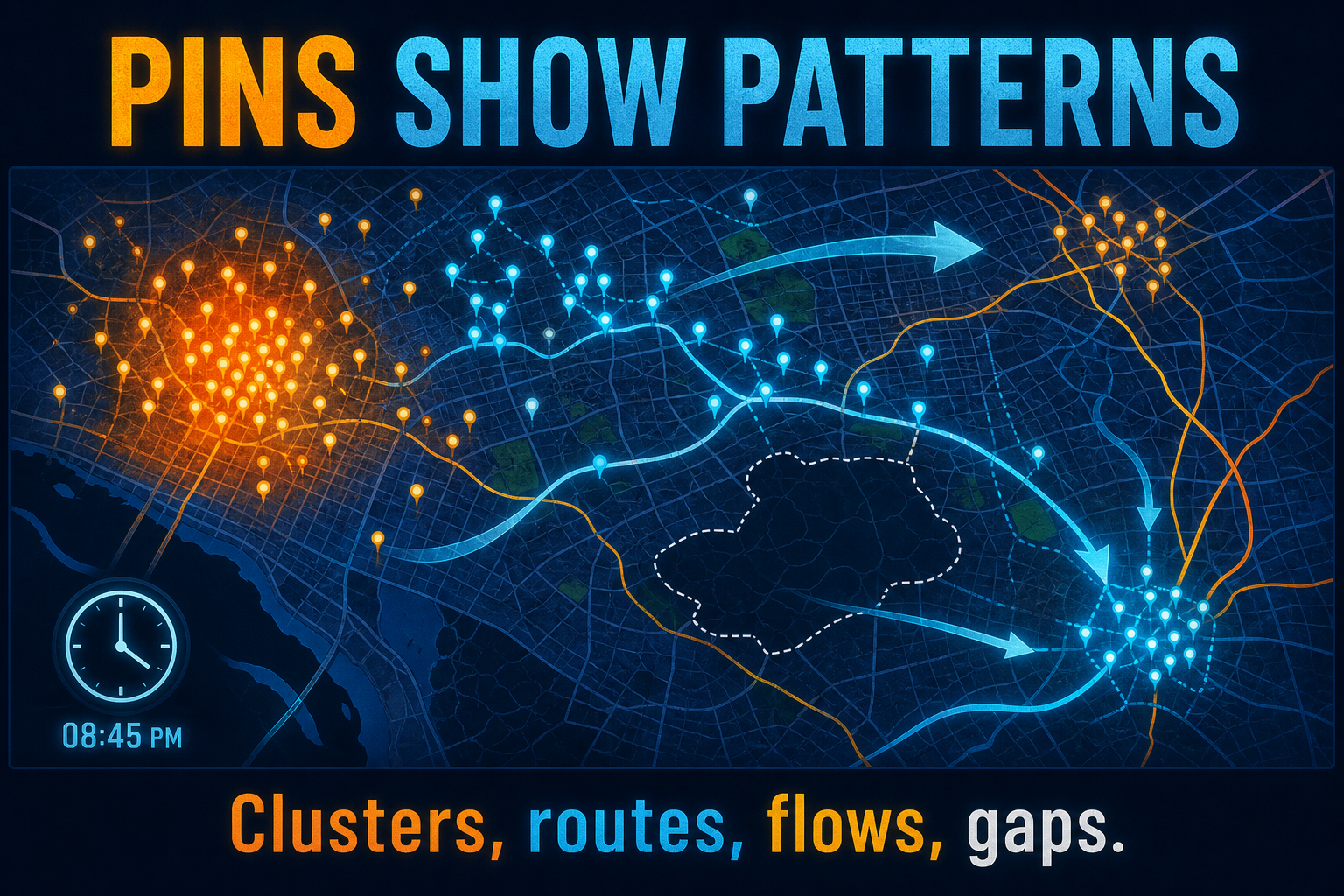
Geotagged data can reveal clusters, routes, flows, gaps, and movement patterns.
It is useful, but it can be biased, incomplete, inaccurate, or privacy-sensitive.
Memory Shortcut
Geotagged data = content + location.
GPS finds location.
Geotagging attaches location.
GIS analyzes the pattern.
Data reliability checks bias and privacy.
Start Here: How to Use This Geotagged Data Guide
Learn that geotagged data means data with location attached.
Review examples such as photos, posts, routes, and check-ins.
Compare geotagged data with GPS, GIS, quantitative data, and qualitative data.
Study benefits, bias, privacy, and representation limits.
Finish with MCQs, flashcards, and FRQ practice.
Section 1
📖
Geotagged Data Definition
Geotagged data is information that includes a geographic location. The location may be stored as latitude and longitude, a GPS coordinate, a place label, or location metadata attached to a photo, post, route, check-in, transaction, or digital record. Start on the Geographic Data and Technology path, then compare GIS, GPS, and remote sensing.
Geotagged data
Digital information with location attached.
Geotagging
The process of adding location information to content or activity.
Location metadata
Hidden or visible data that records where content was created or shared.
GPS coordinates
Latitude and longitude values that identify a precise location.
Check-in
A voluntary location tag added to a post, app, or venue record.
Digital trace
A record created by digital activity, such as a post, route, transaction, or app ping.
Point data
Mapped location data shown as dots or pins.
Movement data
Location traces showing routes, flows, or repeated paths.
Geotagging is the process of attaching location information to data. A smartphone can geotag a photo by saving where it was taken. A social media user can geotag a post by selecting a venue. A fitness app can geotag a route by recording GPS coordinates over time.
AP Exam Tip
GPS provides the location; geotagging attaches that location to content or activity.
Geotagging attaches location metadata to photos, posts, routes, check-ins, and other digital activity.
Geotagging connects to absolute location when coordinates anchor content to a precise place on Earth.
Section 3
🔄
How Geotagged Data Works
Geotagged data usually combines a piece of content or activity with a location. The location may come from GPS, Wi-Fi positioning, cell towers, Bluetooth beacons, IP address estimates, or a manual place selection. Once the location is attached, the data can be mapped, counted, clustered, filtered, or analyzed in GIS.
Content or activity is created
A photo, post, route, transaction, check-in, or app event occurs.
Location is detected or selected
GPS, Wi-Fi, cell towers, or a manual check-in provide location.
Metadata is attached
The record stores location, time, device, or place information.
Points or routes are mapped
The data become pins, heat maps, paths, or flow lines.
Patterns are analyzed
Geographers study clusters, routes, flows, gaps, or service needs.
GPS finds coordinates, geotagging attaches coordinates to content, GIS analyzes patterns, and remote sensing observes Earth from a distance.
Read the dedicated GPS, GIS, and remote sensing guides for side-by-side MCQ traps.
Section 6
🧭
How Geographers Use Geotagged Data
Geographers use geotagged data to study where activity happens, how people move, where clusters form, and which places are missing from the data. It is especially useful for tourism, transportation, public health, disasters, urban planning, and service access.
Tourism
Map popular landmarks, photo clusters, and visitor-heavy areas.
Transportation
Study ride-share pickups, delivery routes, congestion, and transit demand.
Disaster response
Map emergency posts, road closures, damage photos, and evacuation movement.
Public health
Analyze location-based symptom reports, clinic access, or outbreak patterns.
Urban planning
Study park use, nightlife, events, crowding, and service demand.
Retail geography
Analyze customer visits, delivery zones, and shopping clusters.
Distance decay
Study how activity decreases as distance from a destination increases.
Movement flows
Map routes, repeated paths, commuting patterns, and event surges.
Pair geotagged movement data with qualitative geographic data when you need motives behind the spatial pattern.
Section 7
🗺️
What Spatial Patterns Can Geotagged Data Show?
Geotagged data can reveal clusters, routes, flows, gaps, hot spots, and changes over time. These patterns are useful only if students also explain who may be missing from the data.
Clusters
Meaning
Many points concentrate in one area.
Example
Tourist posts around landmarks.
Routes
Meaning
Repeated paths or movement lines.
Example
Fitness app routes or delivery paths.
Flows
Meaning
Movement between origins and destinations.
Example
Ride-share trips from nightlife areas to suburbs.
Hot spots
Meaning
Places with high activity.
Example
Emergency calls after a storm.
Gaps
Meaning
Places with few or no data points.
Example
Low smartphone access or limited social media use.
Time patterns
Meaning
Activity changes by hour, day, season, or event.
Example
Stadium posts spike during games.
Geotagged data can reveal clusters, routes, flows, hot spots, gaps, and time-based movement patterns.
Useful for tourism, transportation, disasters, and planning
Can be imported into GIS
Shows observed behavior, not only reported behavior
Helps detect hot spots
Can support fast decision-making
Limitations
Overrepresents people with smartphones and apps
Self-selection bias affects who appears
Social media posts may overrepresent tourists or younger users
GPS accuracy can be poor indoors or near tall buildings
A pin shows where, not always why
Privacy and surveillance concerns are serious
Data may be incomplete or proprietary
Published maps can expose sensitive places or routines
AP Exam Tip
For FRQs, never say geotagged data represents everyone. Explain who might be missing and why.
Geotagged data provides detailed location evidence, but students must evaluate privacy, bias, accuracy, representation, and missing context.Section 9
🔒
Privacy, Bias, and Ethics
Geotagged data can reveal sensitive movement patterns, including where people live, work, worship, study, protest, seek medical care, or spend time. Even when names are removed, repeated location traces can sometimes identify individuals or small groups.
Privacy
Could the data reveal a person's home, school, workplace, or clinic visit?
Consent
Did users knowingly share their location?
Surveillance
Could companies, governments, or bad actors monitor movement?
Technology bias
Who is missing because they lack smartphones, apps, data plans, or location-sharing?
Self-selection bias
Who chose to post or check in, and who stayed silent?
Tourist skew
Do visitors post more than residents?
Demographic bias
Do younger, wealthier, urban, or tech-savvy groups appear more often?
Sensitive places
Could mapping shelters, clinics, protests, camps, or places of worship create harm?
AP Exam Tip
Strong AP answers explain both the useful spatial pattern and the privacy or representation limitation.
Evaluate representation risk with the data reliability and bias guide before drawing population-wide conclusions.
Review geospatial privacy safeguards such as aggregation, anonymization, consent, and re-identification risk when location metadata could expose sensitive places.
Section 10
📊
Geotagged Data Compared With Other Data Types
Feature
Geotagged Data
Quantitative Geographic Data
Qualitative Geographic Data
Source
Phones, apps, GPS, social media, digital platforms
Counts, rates, measurements, statistics
Interviews, observations, field notes, photos, narratives.
Update speed
Real-time to frequent
Varies; often periodic
Usually slower and smaller-scale.
Best for
Activity locations, movement, clusters, routes
Measuring and comparing patterns
Explaining meaning, perception, and lived experience.
Fix: GPS finds location; geotagged data attaches location to content or activity.
Treating geotagged data as complete
Fix: It often misses people without smartphones, apps, or location-sharing.
Ignoring privacy
Fix: Location traces can reveal sensitive routines and places.
Saying it shows why people move
Fix: It shows where activity happens; causes may need interviews or surveys.
Ignoring self-selection bias
Fix: People who post or check in may differ from people who do not.
Assuming all points are accurate
Fix: GPS can drift indoors, underground, or near tall buildings.
Forgetting GIS
Fix: Geotagged data becomes more useful when mapped and analyzed in GIS.
Using vague bias language
Fix: Name the missing group, such as older adults, rural residents, low-income users, or people without smartphones.
Common Mistake: Treating geotagged social media as a complete population sample misses technology bias and self-selection bias.
Section 12
📝
AP Exam Strategy for Geotagged Data
In MCQs
Identify geotagged data from clues about photos, posts, routes, check-ins, metadata, or GPS-tagged records.
Separate GPS from geotagged data.
Recognize privacy, bias, and representation concerns.
Interpret clusters, hot spots, routes, and gaps.
Compare geotagged data with census-style or survey-style data.
In FRQs
Define geotagged data.
Identify what is tagged and where.
Describe the spatial pattern.
Explain a useful planning or analysis application.
Explain one limitation such as privacy, self-selection bias, technology bias, or missing context.
Tagged Content → Spatial Pattern → Usefulness → Missing Group or Privacy Limit
Example: Geotagged social media posts cluster near downtown landmarks, showing tourist-heavy areas where the city may need crowd control, transit service, or sanitation. However, the data may overrepresent younger visitors who post online and underrepresent tourists who keep location services off.
Prompt: A city tourism office studies geotagged social media posts to understand where visitors spend time. The posts cluster near downtown landmarks, sports stadiums, and waterfront restaurants.
A. Define geotagged data.
B. Explain how geotagged data could help the tourism office.
C. Explain one limitation of using geotagged social media posts.
D. Explain one privacy concern related to geotagged data.
Suggested answer:
A. Geotagged data is information that includes a location, often through GPS coordinates, connecting content or activity to a specific place.
B. Geotagged posts can show where visitors concentrate, helping the city plan transportation, signage, sanitation, security, crowd management, and visitor services near high-activity areas.
C. A limitation is technology and self-selection bias. The posts may overrepresent younger visitors, tourists with smartphones, social media users, and people who allow location sharing, while missing people who do not post online.
D. A privacy concern is that geotagged data can reveal personal movement patterns, including where people travel, shop, work, worship, seek medical care, or spend time.
Rubric
Part A: Must mention location information tied to content, activity, or data.
Part B: Must connect clusters or location patterns to a planning or decision-making use.
Part C: Must explain a specific limitation or missing group.
Part D: Must explain a concrete privacy risk involving movement, routines, sensitive places, or personal identification.
Geotagged Data Practice Questions for AP Human Geography
Use these geotagged data practice questions to test whether you can identify geotagged data, compare it with GPS and GIS, interpret clusters and routes, and explain limitations such as privacy, bias, accuracy, and missing groups.
Geotagged data is information that includes a specific location. It is often created when GPS coordinates attach to photos, posts, routes, check-ins, or app activity.
What is a simple example of geotagged data?
A smartphone photo that saves where it was taken is a simple example of geotagged data. Other examples include social media check-ins, fitness routes, ride-share pickups, and delivery app locations.
What is geotagging?
Geotagging is the process of adding location information to data. Attaching GPS coordinates to a social media post, photo, route, or check-in is geotagging.
Is GPS data the same as geotagged data?
No. GPS data supplies location information, while geotagged data attaches that location to content or activity such as a photo, post, route, or record.
How do geographers use geotagged data?
Geographers use geotagged data to study movement, tourism, transportation, urban activity, disaster response, public health, service access, clusters, routes, flows, and spatial patterns.
Why is geotagged data useful?
Geotagged data is useful because it connects human activity to specific places, often in near real time, helping geographers map clusters, routes, flows, hot spots, and gaps.
What is one problem with geotagged data?
One problem is technology bias. Geotagged data often overrepresents people with smartphones, apps, data plans, and location-sharing enabled, while underrepresenting offline groups.
Why does geotagged data create privacy concerns?
Geotagged data can reveal where people go, how they move, and which sensitive places they visit, which may expose homes, routines, workplaces, schools, clinics, or places of worship.
Where does geotagged data appear on the AP Human Geography exam?
Geotagged data often appears in stimulus questions about modern geographic data, urban geography, transportation, tourism, population movement, privacy, bias, and GIS analysis.
How is geotagged data different from quantitative geographic data?
Geotagged data is defined by location metadata attached to content or activity. Quantitative geographic data is defined by numbers, counts, rates, or measurements. Geotagged data can also be quantitative if it is counted or measured.
What is a geotagged data AP Human Geography example?
A geographer mapping GPS-tagged social media posts to identify tourist concentration around landmarks is an AP Human Geography example of geotagged data.