Pair sources before you lock an answer
Read legends, scales, units, and captions together—decide whether evidence supports a regional trend or a misleading aggregation inside one polygon.
GIS in AP Human Geography explains how this topic appears across places and scales. Use it to interpret map evidence, compare spatial patterns, and write precise AP-style geographic explanations.
Practice with real AP Human Geography examples, compare spatial evidence across maps, and review with 22 flashcards plus 16 AP-style questions with explanations.
Learn in 7 mins · Practice in 10 mins
GIS is a geographic information system—software that stores layers of vector and raster data, displays them on digital maps, and runs spatial queries such as buffers and overlays. Urban planners, epidemiologists, and emergency managers stack flood zones, parcels, and demographics to compare scenarios before recommending policy.
Think of GIS in geography as the discipline’s workspace for turning location-tagged information into answers. While a paper map can show one theme at a time, GIS software keeps each theme in its own layer so you can ask spatial questions: Where do hazards overlap vulnerable people? Which census tracts sit farther than ten minutes from the nearest hospital? Where did forest cover disappear fastest between two census periods? Those prompts mirror released-item language because College Board wants you to connect GIS technology to real planning and research decisions.
When teachers say “learn one solid example,” they mean an example you can narrate under pressure: a city opening a fire station, a health department routing vaccines, a retailer choosing a site, a farmer varying inputs by soil grid. Memorize the logic — stacked layers + spatial analysis — more than any brand name. Brand names help when a stimulus cites ArcGIS Online or QGIS, but points come from explaining what the software is doing conceptually.
Finally, keep the three-tool triangle straight on every practice set: GPS answers “where am I?” with coordinates; remote sensing collects surface information from above; GIS layers many datasets and analyzes relationships. Exam writers love distractors that swap those roles. Read slowly, underline verbs (collects, locates, layers), and match verbs to the right technology before you bubble.
Pair this page with map types overview so you can describe GIS outputs (choropleths, buffers, heat maps) as cartographic products, not magic. Pair it with dot distribution maps when prompts contrast density dots with polygon summaries — you will sometimes defend why planners chose one visualization over another. Add choropleth shaded-region interpretation when stems color counties or states, and rehearse spatial analysis vocabulary for Unit 1 when FRQs ask how patterns shift across stacked layers.
Students aiming for a 4 or 5 should rehearse a thirty-second spoken definition, a ninety-second site-selection story with named layers, and a sixty-second limitation sentence about dirty data or privacy. If you can deliver those three soundbites, most MCQs and FRQ parts about GIS will feel familiar rather than foreign.
In one sentence: A GIS takes data with locations and places it on a digital map so you can see and study the pattern. Data sits in layers you can stack, hide, and combine. The map answers questions a table alone cannot: where things cluster, what sits near what, and how places change across years.
Everything else — Esri versus QGIS, vector versus raster, geocoding hygiene — builds on that single idea. AP Human Geography expects recognition, not professional certification. If you can define GIS, supply one realistic layered example, and separate GIS from GPS and remote sensing, you have cleared the highest-frequency prompts.
This section is your landing pad for searches like gis explained for beginners geography: keep the mental model visual (clear sheets, stacked ask), then add vocabulary once the picture sticks.
Four-layer stack (conceptual)
GIS stands for Geographic Information System. It is a computer-based tool that captures, stores, layers, and analyzes geographic data on a map. Each layer holds one theme — population, roads, flood risk — stacked so geographers can study how places relate. GIS in geography is the main geospatial technology AP Human Geography Unit 1 tests.
Outside the classroom, GIS in real life shows up whenever organizations put evidence on a map before they spend money: city planners sketch school locations against zoning, epidemiologists plot cases beside clinics, retailers compare incomes and drive times, and emergency managers route evacuations using flood polygons layered over road graphs. Anytime someone says, “Let’s put this on a map to see the pattern,” they are thinking like a GIS analyst even if the software is lightweight.
For students asking what is gis in geography in plain language: GIS is how teams store world information digitally by location, then query that stack for answers spreadsheets struggle to reveal. The skill AP rewards is recognizing when layered reasoning — not a single image or lone coordinate — drives the story.
Simple definition: A Geographic Information System is software that links spatial data to real-world coordinates and lets you display, layer, and analyze that information on a digital map.
In AP-style wording, GIS technology is the integrated system geographers use to manage geospatial data, run spatial analysis, and publish maps that support decisions. When a prompt asks for the gis definition ap human geography teachers emphasize, include layers plus analysis — not “a map on a phone.”
Computers, servers, or field tablets that run GIS software and store large datasets.
Desktop or cloud apps such as ArcGIS, QGIS, or Google Earth that build maps, queries, and dashboards.
Geographic information tied to places: census polygons, GPS tracks, satellite scenes, business points — classic spatial data GIS examples appear whenever exams mention shapefiles, imagery, or address layers.
Analysts and planners who craft questions, clean inputs, and interpret outputs responsibly.
Rules for overlays, buffers, joins, and summaries — the workflow behind trustworthy maps.
Strip away the jargon and GIS is one habit: put spatial data on a map, then ask geographic questions. Hardware upgrades and prettier basemaps still serve that same workflow.
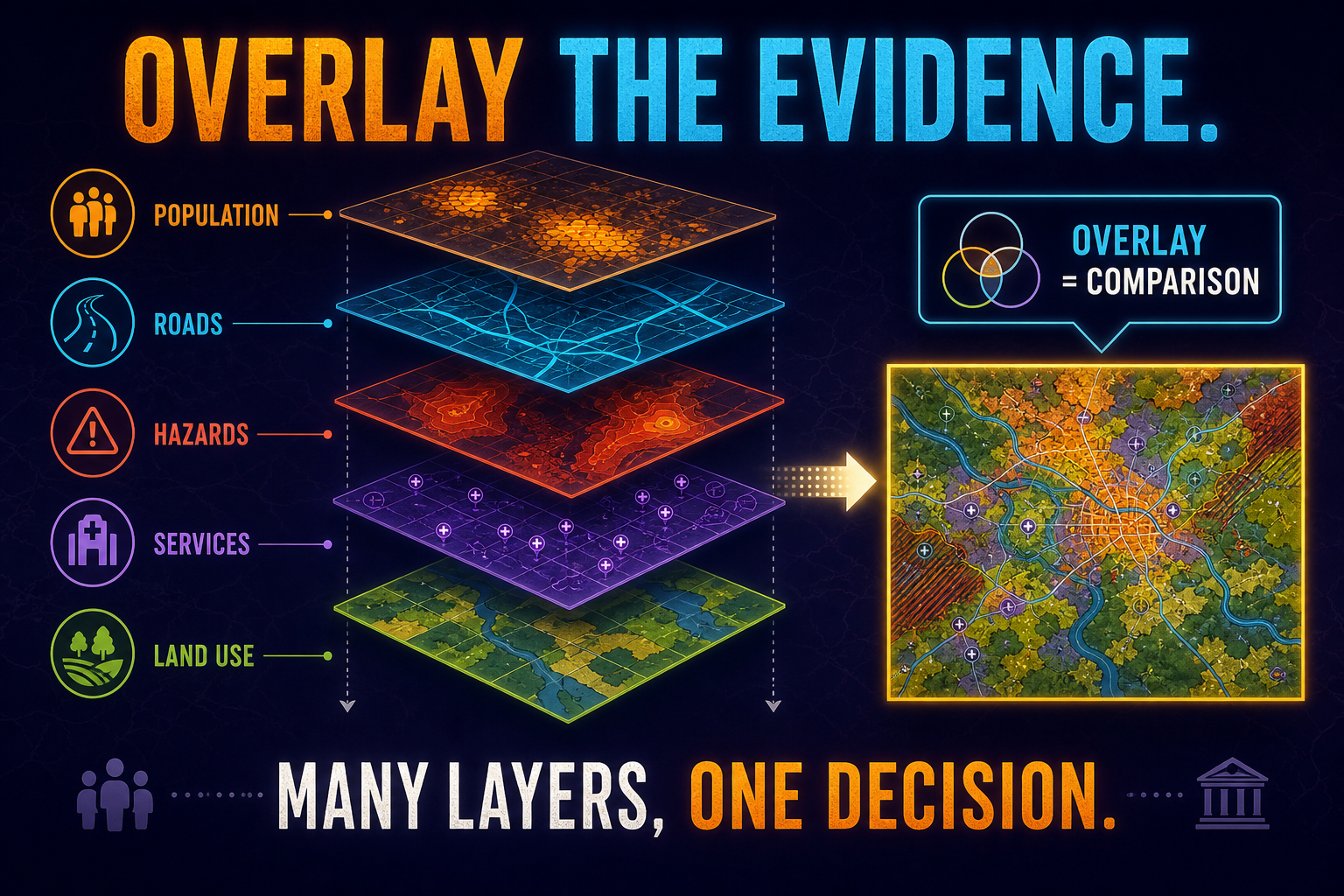
The core idea for how gis works geography courses emphasize is layers. Imagine printing separate themes on transparent film: roads on one sheet, population on another, flood risk on another. Lay them on a light table and relationships appear — for example, busy roads crossing floodplains inside dense neighborhoods. Digital GIS does the same thing with georeferenced data, letting analysts toggle layers, adjust transparency, and run queries such as “select block groups inside the flood polygon with median age over 65.”
That query illustrates why teachers repeat gis mapping explained as a story about overlay and measurement, not about colorful icons. The map is the interface; the analysis is the argument.
Layer stack (bottom → top)
Each sheet stays tied to real coordinates. Analysts turn layers on/off, change symbology, and measure overlap — that is the mental picture AP wants when you explain how GIS works on an FRQ.
This section backs searches for geographic information systems examples, uses of gis in real life, and examples of gis in ap human geography exam stems. Examiners reward concrete stories — not reciting a definition twice.
Zoning, traffic counts, school districts, and park access layered to prioritize capital spending.
Case points, hospital capacity, and vulnerable populations combined for outbreak response — the modern echo of classic cholera mapping logic.
Flood extents, road networks, shelters, and demographic risk stacked to plan evacuations and logistics.
Demographics, competitor spacing, traffic, and income bands analyzed before signing a lease.
Precision workflows layer soil grids, yield monitors, and rainfall to vary seed and fertilizer rates.
Precinct turnout layered with demographic surfaces to interpret shifts and plan outreach.
Sea level, land cover, and species ranges stacked to model exposure and habitat pressure.
Routing engines combine road graphs, live traffic, and delivery stops — GIS-backed optimization even when consumers only see a dot on a phone.
Every scenario above can appear as an MCQ stem. If the passage describes multiple datasets fused for a location decision, select GIS — not GPS alone, not raw imagery alone.
Use this scan list when you encounter how to identify gis questions ap human geography searches — it mirrors how writers construct stimuli.
Gis vs gps vs remote sensing ap human geography prompts are predictable once you separate collection from analysis. GPS acquires positions; remote sensing acquires imagery or scans; GIS stores those inputs (and hundreds more) as layers for questioning.
| Feature | GIS | GPS | Remote sensing |
|---|---|---|---|
| Full name | Geographic Information System | Global Positioning System | Remote sensing (not an acronym) |
| Core job | Layer and analyze geographic data | Provide precise coordinates for receivers | Capture surface information from a distance |
| Typical output | Maps, dashboards, suitability surfaces | Latitude/longitude fixes | Satellite images, lidar scans, aerial photos |
| Example | City zoning + flood + demographic overlay | Phone showing your dot on a basemap | NASA forest-loss imagery |
| Exam clue | Multiple datasets combined | Exact location language | Platforms flying overhead |
Graders expect you to say GIS is the analysis environment, while GPS tracks and remote sensing scenes become inputs once imported. A satellite raster draped in GIS can be classified, masked, and compared year-to-year — that processing story is what separates GIS from “pretty picture” answers.
This heading targets how does gis help geographers and other student queries about value beyond vocabulary lists.
For AP Human Geography, emphasize that GIS expresses the modern geographic mindset: spatial, layered, data-informed, and accountable to real places. That synthesis sentence closes many short-answer items cleanly.
Hands-on practice accelerates recognition questions — even thirty minutes in a browser builder teaches what “layer” feels like.
Industry-standard suite used by agencies; schools often provide ArcGIS Online logins.
Free open-source desktop GIS with powerful analysis tools — anchor answer for many “free GIS” MCQs.
3D globe exploration with KML layers; great for storytelling projects.
Lightweight web mapping for student polygons and collaborative layers.
Combines narrative text with live maps for presentations.
Community basemap data consumed by many GIS apps for routing and humanitarian tasks.
Start with Google My Maps or an ArcGIS Online school account if you need fast wins. Export curiosity into QGIS when you want to experience buffers and real spatial analysis tools firsthand.
MCQs ask you to separate GIS from GPS and remote sensing, pick scenarios where layers support decisions, or identify outputs like buffers and suitability maps.
FRQs may describe a planning or health scenario and ask how layered data supports a location decision or what limitation dirty data introduces.
Dashboard maps, multi-layer PDF excerpts, short passages mentioning shapefiles, buffers, or overlays.
Strong AP answer structure: Technology (GIS layers spatial analysis) → Evidence (name layers used) → Decision (what the overlay shows) → Limitation (data vintage, resolution, or privacy).
GIS is BEST described as:
Every fifth card transition shows an ad placeholder with a three-second countdown before the next card appears.
Use the score card to track accuracy. After every fifth answered question you will see an ad placeholder with a three-second countdown before the next question loads.
Prompt: Geographic Information Systems (GIS) are widely used in modern geography.
A. GIS, or Geographic Information System, is a computer-based system that captures, stores, layers, and analyzes geographic data on a digital map so geographers can study spatial patterns and relationships.
B. A city planning department uses GIS to site a new fire station: planners layer population density, existing stations, road networks, and measured response times to reveal neighborhoods with the longest expected waits.
C. GIS differs from GPS because GIS analyzes many layered datasets across space, whereas GPS is a satellite positioning service that returns precise coordinates for a receiver — coordinates that can become one input layer inside GIS but do not perform multi-layer analysis alone.
Part A: Credit references to computer-based processing, layers, and analysis — not just “digital map.”
Part B: Credit specific layers or decisions (not vague “GIS helps maps”).
Part C: Credit a sharp contrast with GPS or remote sensing plus one concrete detail.
Part A stops at “shows maps on computers”; Part B forgets to name data themes; Part C claims all three technologies do the same task.
GIS, or Geographic Information System, is a computer-based system that layers and analyzes geographic data on a digital map. AP Human Geography Unit 1 tests it as the main geospatial technology used by modern geographers.
Geographic Information System. Both forms — GIS and the full name — count as correct on the AP exam.
A city department layering population density, traffic, and flood zones on a digital map to decide where to build a new fire station is a classic GIS example. Health agencies, retailers, farmers, and emergency services all use GIS in similar layered ways.
GIS analyzes layered geographic data on a digital map. GPS is a satellite-based system that finds the exact coordinates of a device. Remote sensing collects data about Earth's surface from a distance, usually by satellite. GPS and remote sensing feed data into GIS — they collect, GIS analyzes.
Remote sensing collects data about Earth's surface from a distance. GIS analyzes that data — and many other inputs — on layered maps. Remote sensing imagery is often loaded as a layer inside GIS.
It lets geographers see spatial patterns, analyze relationships between layers, plan and decide (where to build, where to evacuate), track change over time, communicate findings, and work with large spatial datasets — all of which are core to AP-level spatial thinking.
Yes. QGIS is free and open-source. Google My Maps and Google Earth are free. ArcGIS Online has a free tier and many schools provide free student licenses.
A layer is a single dataset (like roads, population, or rainfall) shown as one stackable sheet inside a GIS. Combining layers is what gives GIS its analytical power and is the most-tested feature in AP MCQs.
A GIS is only as accurate as the data fed into it. Outdated, incomplete, or biased data produces misleading maps. Cost, learning curve, and privacy are also real limitations.
Look for stems that combine multiple types of data on one map, mention spatial analysis, or describe a real-world decision driven by overlapping geographic data (site selection, evacuation, retail, agriculture). If the stem only describes a satellite image, it's remote sensing. If it only describes finding exact coordinates, it's GPS.
Mainly in Unit 1 (geographic tools and thinking spatially), but GIS also appears in Unit 2 (population mapping), Unit 5 (precision agriculture), and Unit 6 (urban planning) FRQs.
Treat this microtopic as living vocabulary—reuse these habits whenever stimuli combine maps, tables, interviews, or timelines.
Read legends, scales, units, and captions together—decide whether evidence supports a regional trend or a misleading aggregation inside one polygon.
Population change, cultural diffusion, borders, rural systems, urban service gaps, and economic indicators all reward the spatial precision you practice in Unit 1.
Name the place, pull a detail from the stimulus, connect to a course concept, and end with a consequences sentence—skip definition dumps.
Call out who collected the data, at what geography, and when. Note missing groups when quantitative and qualitative pieces disagree.