AP Computer Science Principles Unit 1: Creative Development
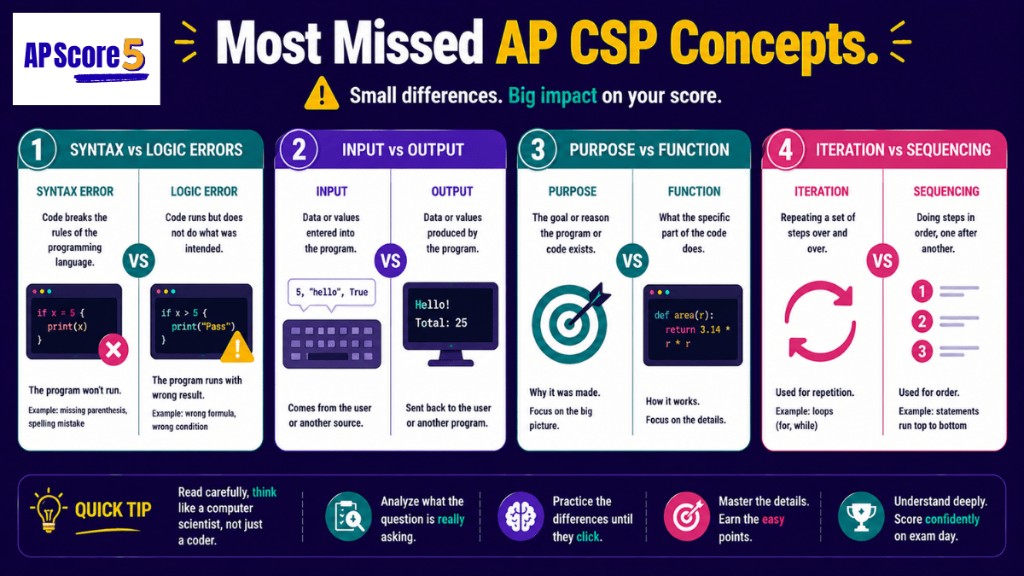
Most students lose easy Unit 1 points from confusing syntax vs logic errors or purpose vs function.
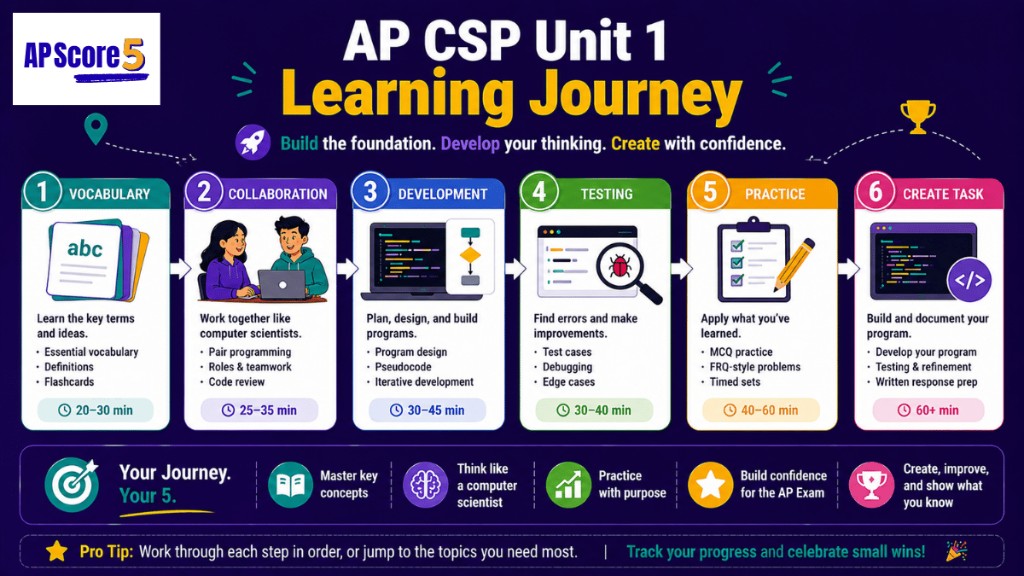
Unit 1 builds the programming habits behind AP CSP multiple-choice questions and your Create Performance Task. Follow one path from vocabulary through practice—at your own pace.
✓8 topic guides — collaboration through documentation
✓50 MCQs + 60 flashcards — with full explanations
✓Create Task prep + diagnostics — route weak topics fast
Each stop has its own guide, examples, and practice. Start anywhere.
What is AP Computer Science Principles Unit 1?
AP Computer Science Principles Unit 1, Creative Development, focuses on the core concepts students need for exam-style reasoning. This guide gives short explanations, diagnostic checks, and progressive practice so students can move from basic recall to application.
Figure - Most missed AP CSP unit concepts
Choose your path
Master AP CSP Unit 1 step by step
Pick a learning path — or browse all 8 topics. Each guide has its own examples, practice, and FAQ.
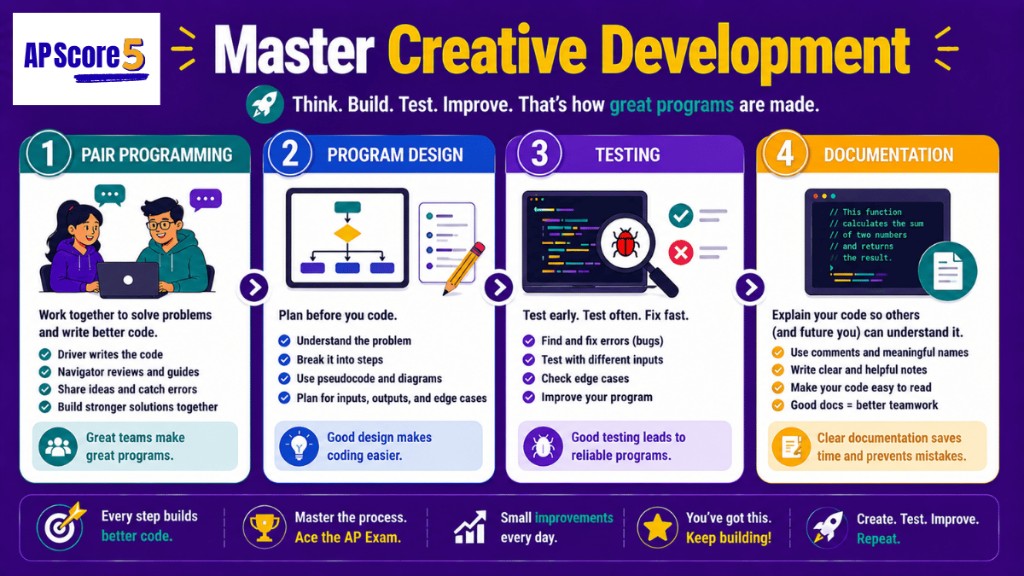
Pair programming puts two developers at one workstation. The driver types while the navigator catches mistakes and thinks ahead, and teams swap roles regularly; paired code often ships with fewer bugs because two sets of eyes catch issues early.
Program purpose and I/O behavior
Every program exists to solve a defined problem. AP CSP Unit 1 questions repeatedly test whether you can identify purpose, list meaningful inputs, and predict outputs from behavior or code segments.
Planning and pseudocode
Strong code starts with planning. Pseudocode describes logic in plain steps before syntax, helping students focus on sequencing, selection, and iteration exactly the way AP prompts are written.
Syntax, logic, runtime errors
Syntax errors block execution, runtime errors crash execution, and logic errors silently produce wrong output. Strong responses name the correct error type and explain why each is detected differently.
Why this unit matters
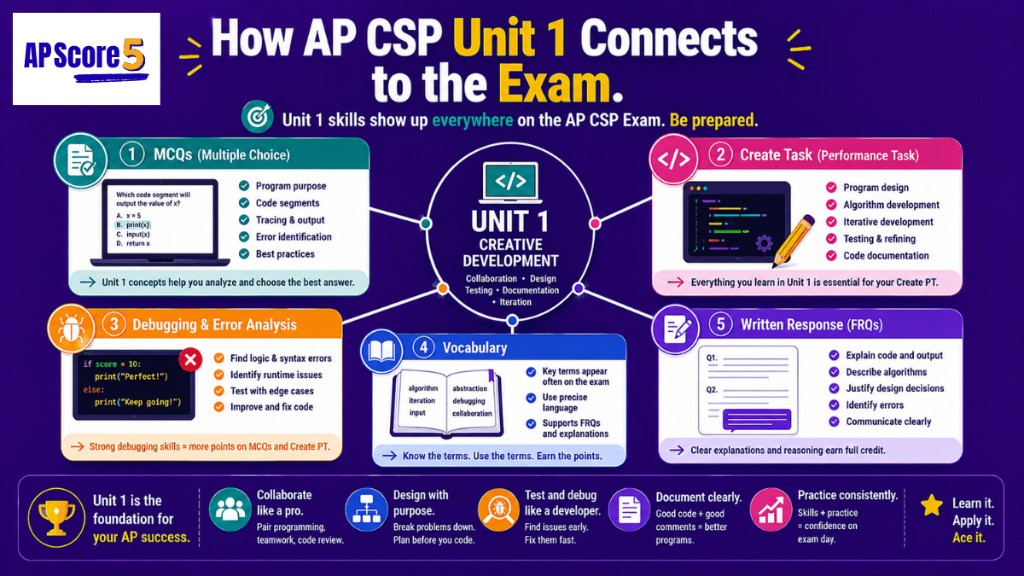
How Unit 1 connects to the AP CSP exam
Unit 1 concepts show up in two places on the AP CSP exam: multiple-choice questions (10–13% of MCQs) and the Create Task performance task (which counts toward your final score). Every topic in this unit maps directly to one or both.
In one sentence: Pair programming uses two roles — driver and navigator — at one workstation so two sets of eyes catch errors as code is written.
The setup. Pair programming uses two roles at one screen: the driver types code and focuses on the immediate line, while the navigator checks logic, catches mistakes, and plans next steps. Teams swap roles every 15–30 minutes.
Why it works. With one person coding alone, syntax and design compete for attention. Pairing splits that load, and studies commonly report lower bug rates when pairs use structured role switches and active communication.
Other team practices the exam tests: communication protocols, version control, iterative feedback, and code review all reduce avoidable defects and improve consistency.
Worked example: If Person A is typing while Person B spots a missing semicolon and suggests an edge case, A is the driver and B is the navigator.
Common mistake: Two students coding separately is collaboration, but it is not pair programming unless driver/navigator roles are active at one workstation.
In one sentence: Every program has a purpose (the user need it solves) and a function (what it actually does when it runs), and AP CSP tests whether you can tell them apart.
Every program has a purpose. AP prompts often ask you to identify what problem a program solves, then decide whether the observed behavior matches that purpose.
Inputs include keyboard, mouse, sensor, file, and network data. Outputs include screen text, files, audio, network transmissions, or hardware signals. Events like clicks and timer ticks trigger responses in event-driven programs.
Worked example: A step-counter app takes accelerometer data and user goal settings as inputs, then outputs step totals, notifications, and saved records.
User needs and constraints: A program can run correctly but still fail if it misses user needs or constraints like connectivity, accessibility, or privacy.
Common mistake: Students describe what code does but skip whether it actually satisfies user purpose.
In one sentence: Pseudocode lets you plan an algorithm in plain language — using sequencing, selection, and iteration — before committing to any specific programming language.
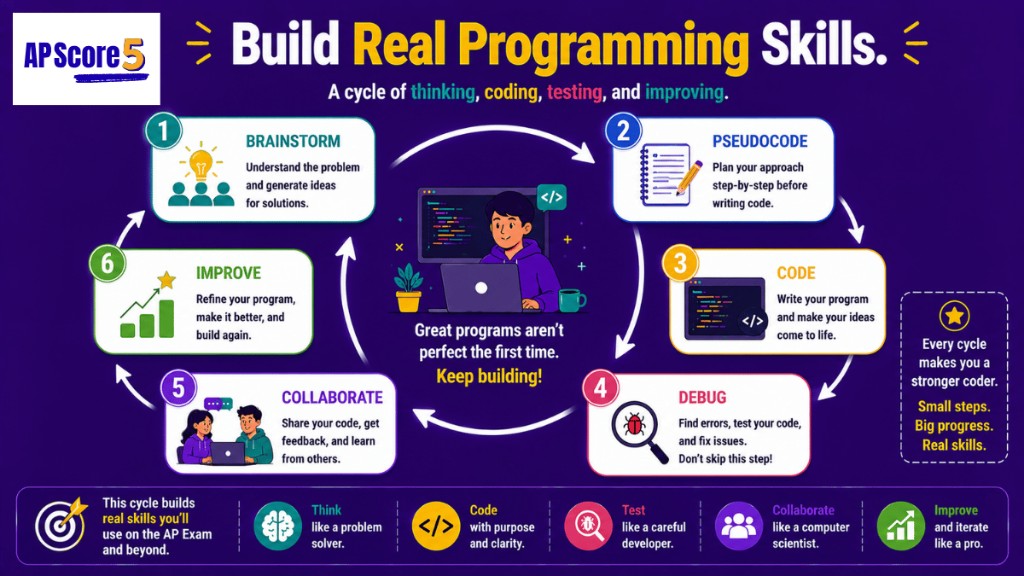
Figure - Six step programming development cycle
Why plan first? Jumping directly into syntax creates rework. Pseudocode lets you design logic in plain language before committing to any programming language.
Core building blocks: sequencing (ordered steps), selection (if/else decisions), and iteration (repeated steps) appear in nearly every AP CSP Unit 1 prompt.
Incremental + iterative development:build small working pieces, test them, collect feedback, and revise repeatedly. Pair this with decomposition and abstraction to keep complexity manageable.
Worked example: Summing values in a list uses initialization, iteration, and accumulation, then outputs a final value; AP questions often ask for the final variable state after tracing this pattern.
Common mistake: Pseudocode is not one strict syntax format; clarity of algorithm steps matters more than exact notation style.
In one sentence: Syntax errors stop a program from running, runtime errors crash it during execution, and logic errors let it run but produce the wrong answer.
Syntax errors violate language grammar and stop execution before run. Runtime errors occur during execution, such as division by zero or invalid index access. Logic errors are the hardest because code runs but returns incorrect results.
Worked example: A loop intended to add 1 through 10 using i < 10 returns 45, not 55. That is an off-by-one logic error fixed by adjusting the condition.
Worked example: If input 0 crashes a divide operation, the issue is runtime error; the fix is validation before division.
Common mistake: If code starts running and then crashes, that is runtime error, not syntax error.
Drill error and test-case types in the Program Testing guide.
Common pitfalls
Where students lose points on AP CSP Unit 1
Most Unit 1 MCQ mistakes come from mixing up similar terms or missing what the question is really asking. The traps below cost the most points.
Syntax vs logic errors
The trap: Students call any failed program a "syntax error."
The truth: A syntax error stops the program from running at all. A logic error lets the program run, but it produces the wrong output. If your loop runs but prints 9 instead of 10, that's a logic error.
Purpose vs function
The trap: Students describe what the program DOES and skip WHY it exists.
The truth: Purpose = the user need. Function = the program's actions. Row 1 of the Create Task rubric asks for both — most students lose points by only writing one.
Input vs event
The trap: Students treat "input" and "event" as the same thing.
The truth: Input is data the program receives (text, numbers, sensor data). An event is a trigger (click, key press, timer tick) that starts a response. A button click is an event; the text typed into a field is input.
Collaboration vs pair programming
The trap: Students call any group work "pair programming."
The truth: Collaboration is the broad term — sharing ideas, testing each other's work, giving feedback. Pair programming is a specific form: two programmers at ONE keyboard, one driving, one navigating.
Iteration (process) vs iteration (loop)
The trap: Students mix up the two meanings of "iteration" in AP CSP.
The truth: As a process, iteration means a full cycle of plan → build → test → refine. As a code structure, iteration means a loop (`for`, `while`) that repeats instructions. Same word, two meanings.
Testing only correct inputs
The trap: Students test their program only with the inputs they expect.
The truth: Strong testing covers normal, edge, and invalid inputs. The bugs that fail real users almost always hide at the edges or in unexpected input — not in normal cases.
How to think through Unit 1 multiple-choice questions
On exam day, strong AP CSP students do not jump to answer choices first. They trace, spot traps, eliminate, and sanity-check edge cases—then pick the letter their work supports.
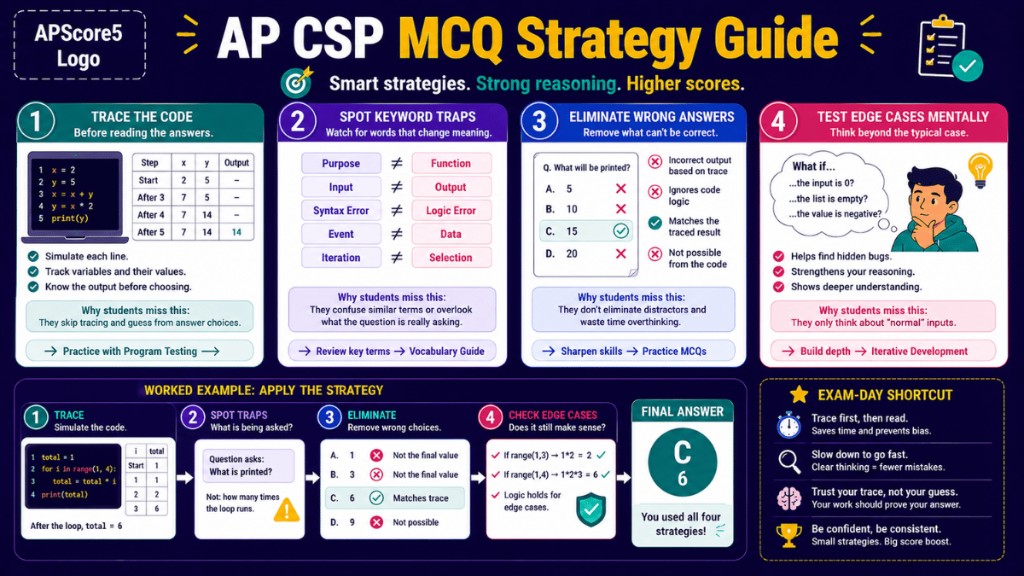
Figure - AP CSP MCQ Strategy Guide Overview
How to Answer AP CSP Unit 1 Questions Faster
Use all four moves on every code-tracing item. If your trace and your chosen letter disagree, trust the trace and re-read the question.
1⌨️
Trace the code before reading answers
Simulate each line. Track every variable change in a small table until you know the output—or the final variable state—the prompt asks for.
Why students miss this: They skim choices first and talk themselves into a guess that never matches a full trace.
Underline what the stem actually asks: printed output, error type, role name, or user need. Watch pairs like purpose ≠ function and syntax error ≠ logic error.
Why students miss this: They answer a familiar-looking question instead of the exact wording in front of them.
total = 1
for i in range(1, 4):
    total = total * i
print(total)
Trace.i = 1 → total = 1; i = 2 → total = 2; i = 3 → total = 6. Output is 6.
Spot traps. The stem asks for printed value—not how many times the loop runs or the final value of i.
Eliminate. Cross out 1, 3, and 12 if they appear; only 6 matches the trace.
Edge check. If range(1, 1) ran, nothing would print—confirms you must trace the given bounds, not assume “typical” input.
Answer:C6 — your trace proves it; the letter is just the label.
AP CSP Unit 1 flashcards
Every 5th card shows an ad placeholder with a 3-second delay before next card.
Card 1 of 60Tap card to flip
AP CSP Unit 1 practice questions (MCQ)
50 questions with rising difficulty and live scoring.
0Correct
0Answered
0%Accuracy
StartStatus
Question 1 of 50Start
Practice AP CSP-Style Written Responses (Unit 1)
Use these AP CSP Unit 1 written-response scenarios to practice identifying mechanisms and justifying fixes with precise vocabulary.
Scenario 1: Error type and fix
A team program should print numbers 1 through 10 but prints 1 through 9. Identify the error type, explain the likely loop-condition cause, and propose a specific fix with reasoning.
Scenario 2: Pair programming roles
Developer A types while Developer B catches a missing semicolon and suggests an edge case. Identify driver and navigator, explain why this catches bugs faster, and state what should happen after 20 minutes.
Scenario 3: Test-case design
Averages are correct for normal lists. Identify two missing edge cases and one boundary case, predict failures, then propose a full normal-edge-boundary-invalid test plan.
Why this matters
AP scorers evaluate evidence and reasoning quality, not just final answers. These scenarios train claim-evidence-reasoning habits directly tied to exam credit.
5–10 minute daily study loop
Day 1
Review core terms from the first two sections.
Day 2
Answer 10 questions and review explanations.
Day 3
Revisit missed items and explain each correction.
Day 4
Mix flashcards and practice for retention.
Day 5
Run a timed mini-set and check accuracy.
Day 6-7
Repeat weak-topic practice before next unit.
Make your study stick
Track your AP CSP Unit 1 streak
Sign up free to save weak topics, build a daily practice streak, and unlock Create Task project ideas.
🔥
Build a Unit 1 streak
Daily practice that adapts to your weak topics.
🎯
See missed terms automatically
Vocab cards you rate "Nope" come back more often.
🚀
Practice Create Task prompts
Get sample written response prompts to drill before exam day.
Is there an AP CSP Unit 1 Quizlet or Scribd version?
Many students look for AP CSP Unit 1 sets on study apps like Quizlet or document sites like Scribd. Those decks vary in quality and may not match the current AP CSP exam outline. This hub gives you 60 vocab flashcards with two-sentence explanations, a 10-question diagnostic, 50 exam-style MCQs with reasoning, 3 written-response scenarios, and eight topic guides—so you can study from one aligned source instead of patching together PDFs.
How do I get AP CSP Unit 1 test answers?
Real AP exam questions stay secure after test day, so published answer keys for official items are not available. The legal way to prepare is practice with new questions: use the diagnostic and 50 MCQs on this page. Each question includes why the correct choice works and why the others do not, matching the explain-your-reasoning skill the exam expects.
What's the best way to review AP CSP Units 1-1?
For your first pass: take the 10-question diagnostic, work through the Vocabulary guide flashcards, then open the topic guides you missed—pair programming, program purpose, testing, and documentation are usually highest-yield. Finish with the full MCQ set and one written-response scenario. Revisit missed flashcards and MCQs every few days so terms stay fresh before you start Unit 2.
How hard is AP CSP Unit 1 on the exam?
Unit 1 is usually one of the more approachable CSP units because questions focus on process vocabulary, program purpose, and error types—not heavy math. It still accounts for roughly 10–13% of multiple-choice items and underpins the Create Performance Task. Most lost points come from confused pairs (syntax vs logic errors, input vs events, purpose vs function) rather than from calculation.
What topics are covered in AP CSP Unit 1 Creative Development?
How does AP CSP Unit 1 prepare me for the Create Performance Task?
Unit 1 skills map directly to Create PT rubric rows: clear program purpose, iterative improvement, test cases (including edge cases), and documentation that explains design choices. MCQs also ask you to trace code, spot errors, and justify behavior—the same habits you need when writing Create Task responses. Use the Create Task guide with the Iterative Development and Program Testing guides while you build and refine your project.
Keep exploring Unit 1
Related AP CSP Unit 1 guides
Pick any of these to go deeper before moving on to Unit 2.