Which statement best describes lossless compression?
Q1Explanation: Lossless compression preserves the original data so it can be reconstructed exactly.
AP Computer Science Principles · Unit 2 · Data
Unit 2 · Compression types · ~8 min read
Lossless and lossy compression are two ways to reduce file size in AP Computer Science Principles Unit 2. Lossless compression allows the original data to be restored exactly. Lossy compression removes some data permanently to make files smaller.
On this page, you will learn when exact reconstruction matters, when small quality loss is acceptable, how to choose between formats in AP-style scenarios, and how to avoid the most common lossless vs lossy mistakes.
In AP CSP, lossless compression restores the original exactly; lossy compression removes some data permanently for smaller files—match the scenario to exactness or acceptable quality loss.
Lossless compression reduces file size while allowing the original data to be restored exactly. Lossy compression reduces file size by permanently removing some data, so the original cannot be perfectly restored.
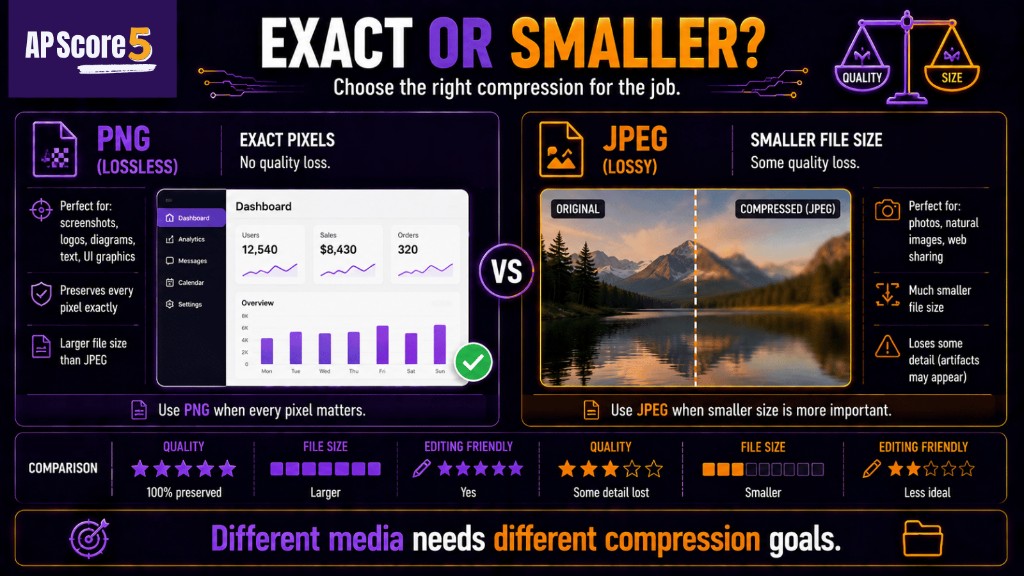
PNG preserves exact image detail, while JPEG reduces quality to achieve smaller file sizes.
Tiny example: A ZIP file is usually lossless because files can be extracted exactly. A JPEG photo is usually lossy because some image detail may be discarded to reduce file size.
For compression ratios and run-length encoding, review Data Compression first if those topics still feel new.
Use lossless compression when every bit of the original data matters. If changing the data could break the file, change meaning, alter evidence, or damage accuracy, lossless is the safer choice.
| Lossless Use Case | Why Lossless Fits |
|---|---|
| Source code | One changed character can break a program |
| Text document | Words and symbols must remain exact |
| Legal document | Signatures and details should not be altered |
| Medical image or measurement | Small changes may affect interpretation |
| Spreadsheet or dataset | Values must remain accurate |
| Program/archive files | Extracted files must match the original |
ZIP is a common lossless archive format. PNG is often used for screenshots, diagrams, and images with sharp edges because it can preserve exact pixels. The AP CSP idea is not to memorize every format, but to explain why exact reconstruction matters.
Use lossy compression when smaller file size matters and small changes are acceptable. Lossy compression is common for photos, music, video, and streaming because humans may not notice the removed detail.
| Lossy Use Case | Why Lossy Fits |
|---|---|
| Photo sharing | Small visual changes may be acceptable |
| Music streaming | Smaller files reduce bandwidth |
| Video streaming | Smaller files help playback |
| Large image library | Storage savings matter |
| Web images | Faster loading may matter more than perfect quality |
JPEG is usually lossy and often used for photographs. MP3 is lossy and often used for music. The key AP CSP reasoning is that the user accepts some quality loss in exchange for smaller files.
Artifacts are visible or audible flaws caused by aggressive lossy compression. Examples include blurry text, blocky image areas, or muddy audio. Artifacts show that lossy compression is a tradeoff, not free storage.
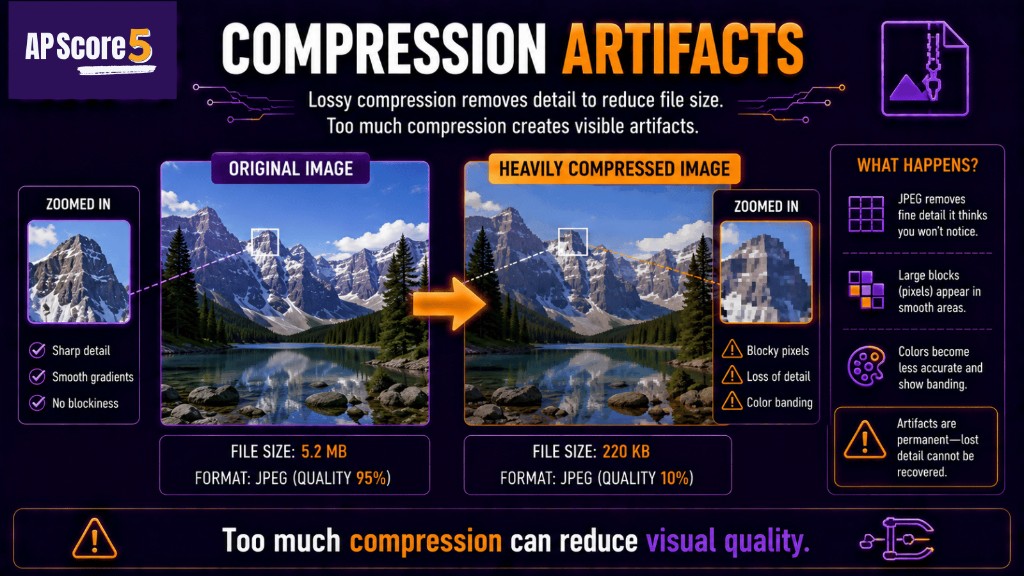
Excessive lossy compression can create visible artifacts and permanently reduce visual quality.
| Feature | Lossless | Lossy |
|---|---|---|
| Original restored exactly? | Yes | No |
| Data permanently removed? | No | Yes |
| Typical file size | Larger than lossy | Often smaller |
| Best for | Text, code, legal, medical, exact files | Photos, audio, video, streaming |
| Main benefit | Preserves the original | Saves more space |
| Main tradeoff | May not shrink as much | Quality/detail may be lost |
| AP clue | Exact reconstruction matters | Some loss is acceptable |
AP CSP questions may mention familiar formats, but the reasoning matters more than memorizing a list. Match the format to the type of data and the acceptable risk.
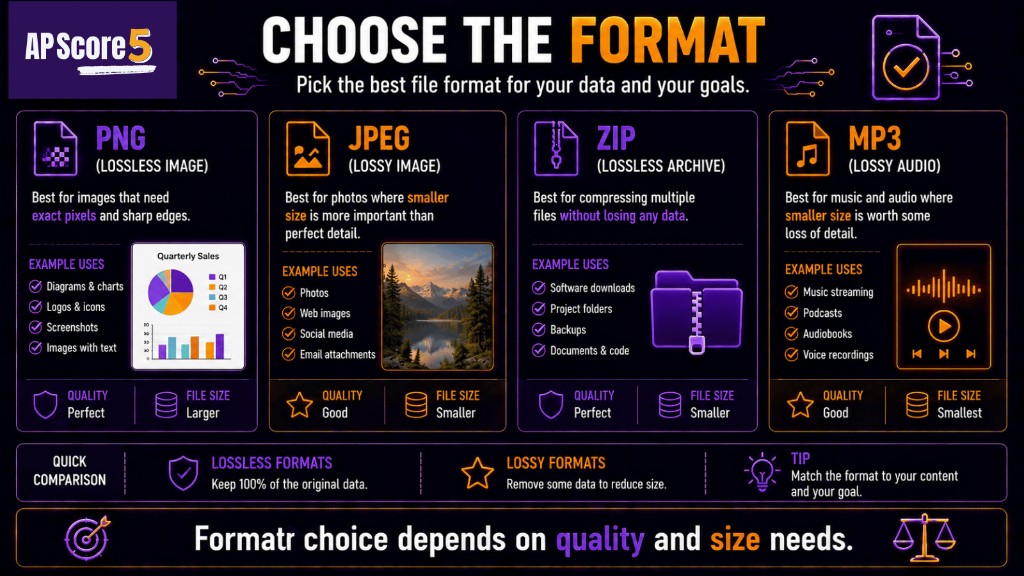
Different file formats balance quality, storage size, and media type in different ways.
| Format | Usually | Best AP CSP Use |
|---|---|---|
| ZIP | Lossless | Bundling files, code, documents |
| PNG | Lossless | Screenshots, diagrams, sharp text, exact pixels |
| JPEG | Lossy | Photos where small quality loss is acceptable |
| MP3 | Lossy | Music or audio streaming |
| Depends | Document container; may include compressed content |
Do not treat every file extension as the whole answer. Explain why the scenario needs exact reconstruction or accepts quality loss.
Use a three-question method before choosing.
| Scenario | Better Choice | Reason |
|---|---|---|
| Source code submission | Lossless | Code must restore exactly |
| Medical scan for diagnosis | Lossless | Detail and accuracy matter |
| Vacation photo for social media | Lossy | Small visual loss is acceptable |
| Music streaming | Lossy | Smaller audio files reduce bandwidth |
| Screenshot with text | Lossless | Sharp edges and exact text matter |
| Video preview online | Lossy | Streaming needs smaller files |
AP answer pattern: Use this sentence pattern: Because [content type] must/must not be restored exactly, [lossless/lossy] is better because [specific reason].
Example: Because a source code file must be restored exactly, lossless compression is better because one changed character could break the program.
| Mistake | Correction |
|---|---|
| Thinking all compression is lossless | Some compression permanently removes data |
| Thinking lossy is always bad | Lossy is useful when small quality loss is acceptable |
| Choosing JPEG for text screenshots | PNG is better when exact pixels or sharp text matter |
| Choosing lossy for code | Code must be restored exactly |
| Memorizing formats without scenarios | Explain why exactness or size matters |
| Assuming lossless always makes tiny files | Lossless may not shrink as much as lossy |
| Thinking decompression restores lossy detail | Lost lossy detail cannot be recovered |
| Confusing ratio math with type choice | Ratio is about size; lossless/lossy is about reconstruction |
AP CSP usually tests this topic through scenarios. The question asks which compression type or format is most appropriate and why.
| Question Type | What to Do |
|---|---|
| Definition | Lossless restores exactly; lossy removes some data |
| Format choice | Match file type to exactness needs |
| Scenario tradeoff | Explain size vs quality/exactness |
| Artifact question | Identify excessive lossy compression |
| Text/code scenario | Choose lossless |
| Photo/music/video scenario | Consider lossy if quality loss is acceptable |
| Medical/legal scenario | Choose lossless because accuracy matters |
After this page, try the Unit 2 quiz or 50-question practice set.
These are short topic checks. For full mixed Unit 2 practice, use the 50-question practice page. Tap an answer to reveal the explanation. Choices shuffle on load.
Which statement best describes lossless compression?
Q1Explanation: Lossless compression preserves the original data so it can be reconstructed exactly.
Which statement best describes lossy compression?
Q2Explanation: Lossy compression reduces file size by discarding some data.
A student needs to compress source code for submission. Which type is best?
Q3Explanation: Source code must be restored exactly; one changed character can break a program.
A student wants to share vacation photos online and can accept slight quality loss. Which type is reasonable?
Q4Explanation: Photos often tolerate small visual loss, making lossy compression useful for reducing file size.
Which format is usually lossy for photos?
Q5Explanation: JPEG is usually a lossy format used for photographs.
Which format is commonly lossless for bundling files?
Q6Explanation: ZIP is commonly used as a lossless archive format.
A screenshot contains small text and sharp UI edges. Which format is usually better?
Q7Explanation: PNG is usually better for screenshots because exact pixels and sharp text matter.
Which scenario most strongly requires lossless compression?
Q8Explanation: Medical images require accuracy and exact detail, so lossless is safer.
What are compression artifacts?
Q9Explanation: Artifacts are flaws such as blockiness, blur, or audio distortion from lossy compression.
Which is the best explanation for choosing lossy compression?
Q10Explanation: Lossy compression is useful when size reduction matters more than perfect reconstruction.
Which is the best explanation for choosing lossless compression?
Q11Explanation: Lossless is best when exact reconstruction matters.
A student chooses JPEG for a text-heavy diagram and the letters become blurry. What likely caused the problem?
Q12Explanation: Lossy compression can create artifacts, especially around sharp text and edges.
Check each skill when you can explain it without looking at notes.
0 of 9 ready
Lossless compression allows the original data to be restored exactly. Lossy compression removes some data permanently to make the file smaller.
Lossless compression reduces file size while preserving all original data. It is best when exact reconstruction matters, such as source code, text, legal documents, medical data, or archives.
Lossy compression reduces file size by permanently removing some data. It is useful when small quality loss is acceptable, such as photos, music, video, or streaming.
JPEG is usually lossy. It is commonly used for photographs because small visual changes are often acceptable in exchange for smaller file size.
PNG is usually lossless. It is often used for screenshots, diagrams, and images with sharp text or edges because exact pixels may matter.
ZIP is commonly lossless. Files extracted from a ZIP archive should match the original files.
Choose lossless compression when the data must be restored exactly. Good examples include source code, spreadsheets, legal documents, medical data, and text-heavy screenshots.
Choose lossy compression when smaller file size matters and some quality loss is acceptable. Good examples include photo sharing, music streaming, video streaming, and web images.
Compression artifacts are visible or audible flaws caused by aggressive lossy compression. Examples include blocky images, blurry text, or distorted audio.
The biggest mistake is memorizing format names without explaining the scenario. AP CSP answers should explain whether exact reconstruction matters or whether quality loss is acceptable.