Metadata is best described as:
Q1Explanation: Metadata describes other data, such as a file’s author, timestamp, type, or size.
AP Computer Science Principles · Unit 2 · Data
Unit 2 · Metadata · ~8 min read
Metadata is data about data. In AP Computer Science Principles Unit 2, metadata can describe a file, photo, email, document, dataset, or digital activity.
On this page, you will learn how metadata works, how it differs from the actual content, how it helps computers organize and search data, and why metadata can create privacy risks when it reveals location, time, author, device, or activity patterns.
In AP CSP, metadata AP CSP means data about data—fields that describe files, photos, emails, or datasets (time, author, size, GPS) without being the main content.
In AP CSP, metadata is data that describes other data. Metadata is not usually the main content itself; it gives context about the content, such as who created it, when it was created, where it was created, what type of file it is, or how large it is.
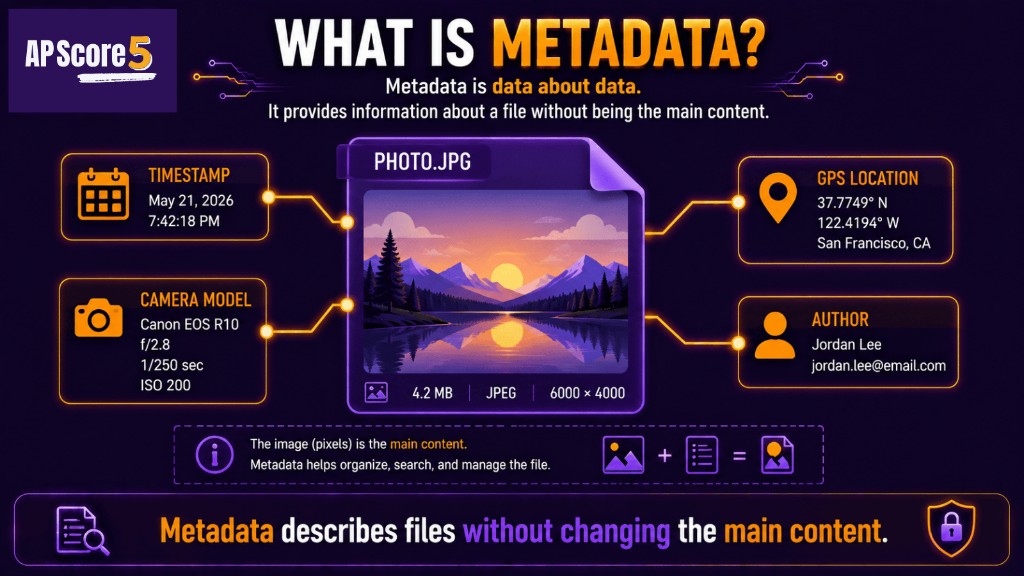
Metadata describes information about a file without changing the file’s main content.
Tiny example: The pixels in a photo are the data. The photo’s timestamp, GPS location, camera model, and file size are metadata.
The easiest way to understand metadata is to separate the main content from the information that describes the content.
| Item | Data | Metadata |
|---|---|---|
| Photo | Image pixels | GPS location, timestamp, camera model, file size |
| Message body | Sender, receiver, subject line, timestamp | |
| Document | Written text | Author, file name, date modified, word count |
| Song file | Audio data | Artist, album, length, file type |
| Dataset | Rows and values | Column names, source, collection date |
File size is measured in bytes; see Bits and Bytes if storage units still feel fuzzy.
Metadata appears almost everywhere in computing. It helps computers organize, search, sort, display, and protect data.
File metadata can include file name, file type, file size, creation date, modification date, author, and permissions.
Email metadata can include sender, receiver, subject line, timestamp, attachments, and routing information. The message body is data; details about the message are metadata.
Document metadata can include author, title, creation date, last modified date, word count, and file version.
Dataset metadata can include column names, units, source, collection date, and descriptions of what each field means.
| Metadata Type | Example | Why It Matters |
|---|---|---|
| File size | 4 MB | Helps estimate storage or transfer needs |
| Date modified | May 21, 2026 | Helps find the newest version |
| Author | Student name | Helps identify creator |
| GPS tag | Latitude/longitude | Can reveal location |
| File type | .jpg, .pdf, .csv | Helps software open the file |
| Column label | temperature_f | Explains what values mean |
EXIF metadata is information stored with many digital photos. It may include the camera model, timestamp, image settings, and sometimes GPS location.
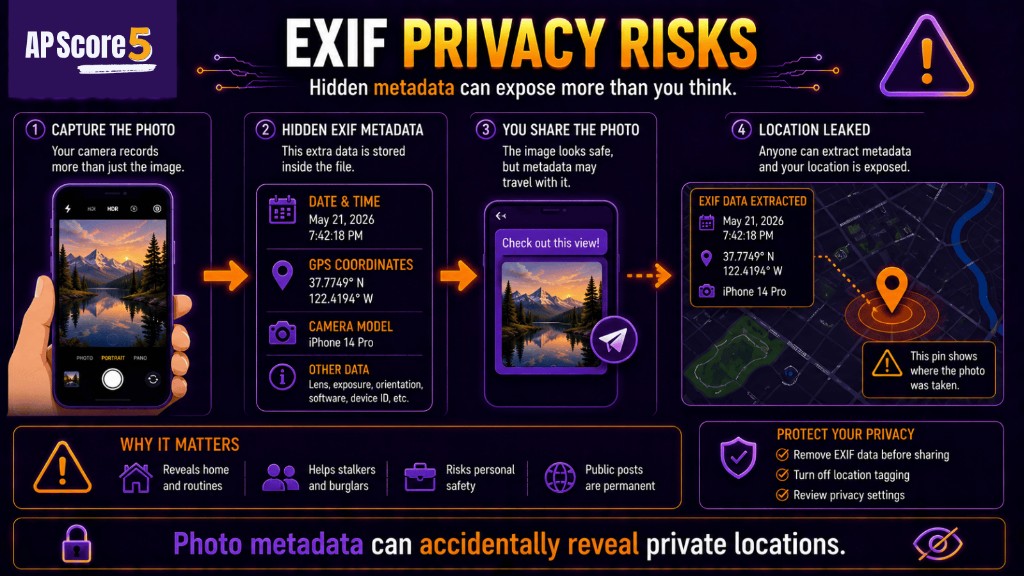
Photo metadata can accidentally expose private locations and personal information online.
| EXIF Field | Example | Possible Risk |
|---|---|---|
| Timestamp | 2026-05-21 2:03 PM | Reveals when a photo was taken |
| Device model | Smartphone model | Reveals device information |
| GPS location | Latitude/longitude | Reveals where photo was taken |
| Camera settings | Exposure, lens, flash | Describes how image was captured |
| Orientation | Portrait/landscape | Helps display the image correctly |
Photo metadata can be useful for sorting and organizing images, but it can also expose private details. A photo shared online may reveal where it was taken even if the location is not visible in the image.
Metadata can create privacy risks because it may reveal information that the user did not intend to share.
| Metadata | Privacy Risk |
|---|---|
| GPS coordinates | Reveals home, school, or travel location |
| Timestamp | Reveals routines or when someone was present |
| Author name | Reveals who created a document |
| Device information | Reveals what device was used |
| Email sender/receiver | Reveals relationships or communication patterns |
| File history | Reveals edits, versions, or hidden activity |
A single timestamp may not seem private, but many timestamps together can reveal routines. Location metadata over time can reveal where a person lives, works, studies, or travels.
Removing or stripping metadata can reduce privacy risk before sharing a file or photo. This is different from changing the visible content. For example, cropping a photo does not always remove GPS metadata.
For deeper privacy, PII, re-identification, and bias risks, review Big Data, Privacy, and Data Bias.
Metadata is not only a risk. It is also useful because it helps computers organize, search, sort, and display information.
| Use | Metadata Example |
|---|---|
| Sort files | Date modified or file name |
| Search documents | Title, author, keywords |
| Organize photos | Date, location, album, device |
| Display media | Song title, artist, duration |
| Protect files | Permissions and access settings |
| Understand datasets | Column names, units, source |
Sorting and search use metadata fields such as date modified, author, or file type—without opening every byte of the main content.
| Mistake | Correction |
|---|---|
| Thinking metadata is the main content | Metadata describes the content |
| Thinking metadata is always harmless | Metadata can reveal private details |
| Thinking cropping a photo always removes GPS | Visible edits may not remove metadata |
| Confusing file size with file content | File size describes the file |
| Confusing timestamp with message body | Timestamp describes when something happened |
| Thinking metadata only appears in photos | Files, emails, documents, datasets, and media all have metadata |
| Ignoring context | The same metadata can be useful or risky depending on how it is used |
| Calling all data metadata | Metadata is specifically data about data |
AP CSP metadata questions usually ask you to identify what counts as metadata, explain how metadata is useful, or recognize a privacy risk.
| Question Type | What to Do |
|---|---|
| Definition | Metadata is data about data |
| Photo scenario | Look for timestamp, GPS, device, or EXIF |
| Email scenario | Sender, receiver, subject, and time are metadata |
| Document scenario | Author, date modified, and file size are metadata |
| Privacy scenario | Explain what hidden detail could be revealed |
| Usefulness scenario | Explain search, sorting, and organization |
| Not metadata | Identify the actual content or payload |
After this page, try the Unit 2 quiz or Unit 2 flashcards for vocabulary recall.
These are short topic checks. For full mixed Unit 2 practice, use the 50-question practice page. Tap an answer to reveal the explanation. Choices shuffle on load.
Metadata is best described as:
Q1Explanation: Metadata describes other data, such as a file’s author, timestamp, type, or size.
Which is metadata for a digital photo?
Q2Explanation: GPS location describes the photo and can be stored as metadata.
Which is the best example of email metadata?
Q3Explanation: Sender and timestamp describe the email rather than being the message content.
A document has an author field, creation date, and file size. These are examples of:
Q4Explanation: Author, creation date, and file size describe the document.
Why can photo metadata create a privacy risk?
Q5Explanation: Metadata such as GPS coordinates or timestamps can reveal private details.
Which action best reduces the risk of sharing GPS location from a photo?
Q6Explanation: Removing location metadata can reduce the risk of exposing where a photo was taken.
Which item is most likely metadata for a song file?
Q7Explanation: Artist name and song length describe the audio file.
A user sorts files by "date modified." What is the user relying on?
Q8Explanation: Date modified is metadata that describes when a file changed.
Which statement is true about metadata?
Q9Explanation: Metadata helps organize and search data, but it can also create privacy risks.
A dataset includes column names and units for each column. What are the column names and units?
Q10Explanation: Column names and units describe the dataset values.
A photo is cropped so a street sign is no longer visible, but the file still contains GPS coordinates. What is the issue?
Q11Explanation: Visible edits do not always remove hidden metadata.
Which answer best separates data from metadata?
Q12Explanation: The message body is the content, while sender and timestamp describe the message.
Check each skill when you can explain it without looking at notes.
0 of 9 ready
Metadata in AP CSP is data about data. It describes a file, photo, email, document, dataset, or digital activity without usually being the main content itself.
Examples of metadata include file size, file type, author, date created, date modified, GPS location, timestamp, camera model, email sender, and email subject line.
Photo metadata is information stored with a digital image, such as timestamp, camera model, image settings, file size, and sometimes GPS location.
EXIF metadata is metadata stored by many digital cameras and phones. It can include camera settings, device information, timestamp, and sometimes GPS location.
Metadata can be a privacy risk because it may reveal hidden details such as location, time, author, device, communication patterns, or activity history.
Yes. GPS location stored with a photo is metadata because it describes where the photo was taken.
Data is the main content, such as photo pixels or an email message body. Metadata describes that content, such as timestamp, file size, author, or sender.
Metadata is useful because it helps computers search, sort, organize, display, and manage data. For example, sorting files by date modified uses metadata.
Not always. Cropping changes the visible image content, but it may not remove hidden metadata such as GPS location or timestamp.
After metadata, study big data, privacy, and data bias to understand PII, re-identification, and broader privacy risks.