What is the main purpose of data compression?
Q1Explanation: Data compression reduces the number of bits needed to store or transmit data.
AP Computer Science Principles · Unit 2 · Data
Unit 2 · Compression · ~8 min read
Data compression is the process of reducing the number of bits needed to store or transmit data. In AP Computer Science Principles Unit 2, compression matters because smaller files can save storage space, transfer faster, and use less bandwidth.
On this page, you will learn why compression is useful, how compression ratios work, how run-length encoding uses repeated patterns, and how to avoid common AP CSP compression mistakes.
In AP CSP, data compression means reducing the number of bits needed to represent data so files can use less storage and transfer faster—always check whether a question asks for ratio or percent saved.
In AP CSP, data compression means reducing the number of bits needed to represent data. Compression can make files smaller, save storage space, reduce transfer time, and help data move across networks more efficiently.
Tiny example: If a 100 MB file is compressed to 25 MB, the compressed file uses less storage and can usually transfer faster.
Start on the AP CSP Unit 2 Guide, or review bits and bytes if file-size units still feel fuzzy.
Compression solves a simple problem: raw data can take up too much storage and take too long to transfer.
| Reason to Compress | Why It Matters |
|---|---|
| Save storage | Smaller files take up less space |
| Transfer faster | Smaller files move across networks more quickly |
| Reduce bandwidth | Streaming and downloads use fewer bits |
| Improve performance | Apps and websites can load faster |
| Handle large media | Photos, audio, and video are easier to store and share |
A compression ratio compares the original file size to the compressed file size. In AP CSP, write the ratio as original : compressed unless the question defines it another way.
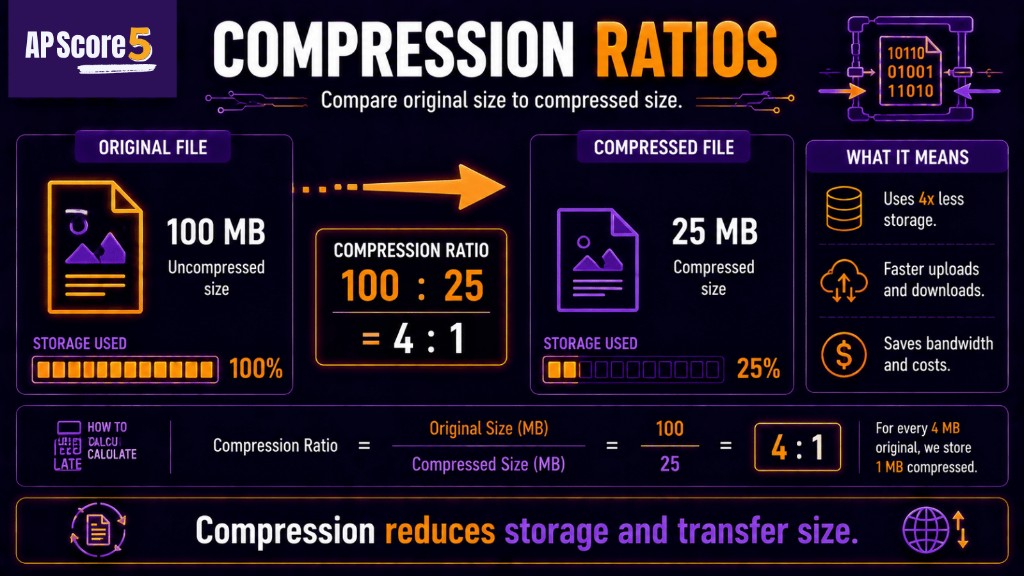
Compression ratios compare original file size to compressed size to show storage savings.
Compression ratio = original size ÷ compressed size
Original size = 100 MB
Compressed size = 25 MB
100 ÷ 25 = 4
Compression ratio = 4:1
| Original | Compressed | Ratio |
|---|---|---|
| 100 MB | 25 MB | 4:1 |
| 80 MB | 20 MB | 4:1 |
| 50 MB | 10 MB | 5:1 |
| 30 MB | 10 MB | 3:1 |
| 12 MB | 3 MB | 4:1 |
Compression ratio and percent saved are related, but they are not the same answer. AP CSP questions may ask for either one.
Percent saved = amount reduced ÷ original size × 100
Original size = 100 MB
Compressed size = 25 MB
Amount reduced = 75 MB
75 ÷ 100 × 100 = 75%
Percent saved = 75%
| Original | Compressed | Ratio | Percent Saved |
|---|---|---|---|
| 100 MB | 25 MB | 4:1 | 75% |
| 80 MB | 20 MB | 4:1 | 75% |
| 50 MB | 10 MB | 5:1 | 80% |
| 30 MB | 10 MB | 3:1 | 66.7% |
| 12 MB | 3 MB | 4:1 | 75% |
Run-length encoding, or RLE, is a simple compression idea. It replaces repeated values with a count and the value.
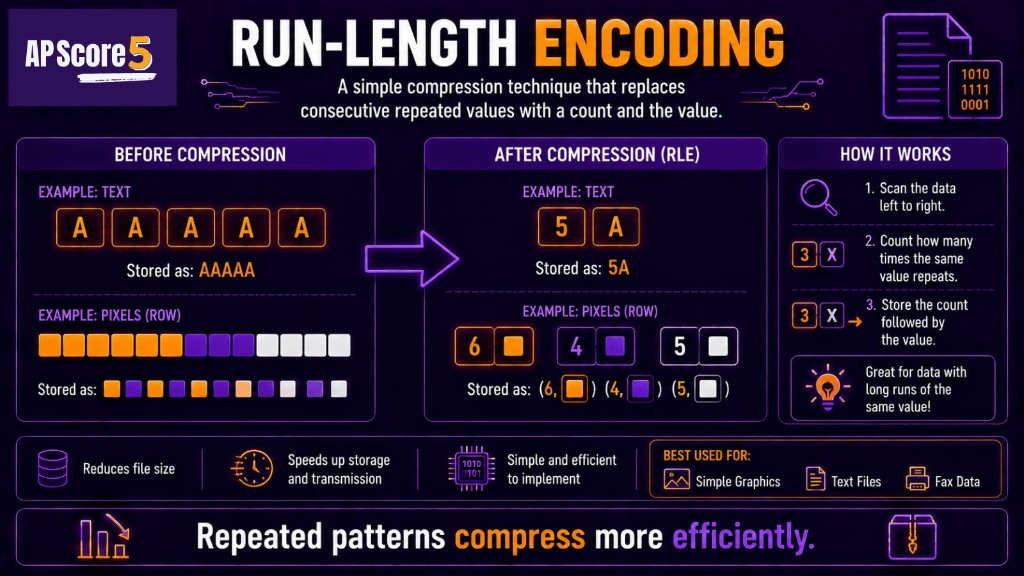
Run-length encoding compresses repeated patterns by storing counts instead of repeating identical values.
Example: AAAAAA can be represented as 6A.
RLE works well when data has long repeated runs. Simple icons, flat-color images, repeated characters, or rows of identical pixels can shrink with RLE.
RLE works poorly when data has few repeated values. A pattern like ABCDABCD may not shrink because there are no long runs to replace.
| Data | RLE Result | Helpful? |
|---|---|---|
| AAAAAA | 6A | Yes |
| BBBBCCCC | 4B4C | Yes |
| ABABABAB | 1A1B1A1B1A1B1A1B | No |
| WWWWBB | 4W2B | Yes |
Compression is useful, but it can involve tradeoffs. A compressed file may save space, but compression can require processing time or may reduce quality depending on the method.
| Benefit | Possible Tradeoff |
|---|---|
| Smaller file size | Time needed to compress/decompress |
| Faster transfer | Extra processing |
| Less storage | Possible quality loss if lossy |
| Lower bandwidth use | Some methods may not preserve every detail |
Lossless compression preserves the original exactly. Lossy compression removes some detail to create smaller files. This page gives the overview; the dedicated Lossless vs Lossy page explains format choices and scenario decisions.
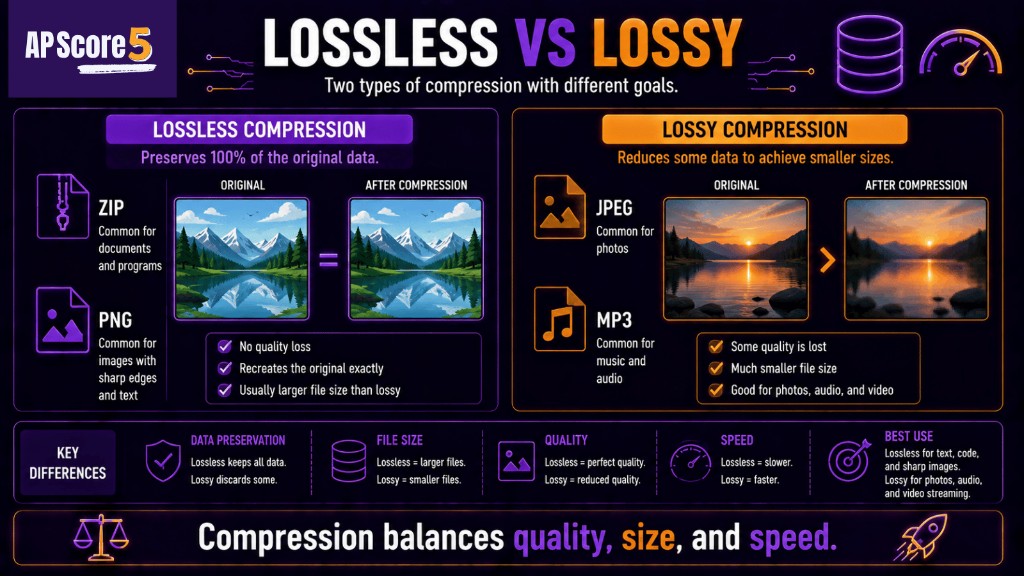
Lossless compression preserves all data, while lossy compression reduces file size by removing some detail.
| Mistake | Correction |
|---|---|
| Thinking compression always improves quality | Compression reduces file size; it does not automatically improve quality |
| Confusing ratio and percent saved | 4:1 is a ratio; 75% is percent saved |
| Reversing the ratio | Use original : compressed unless told otherwise |
| Thinking all compression is lossless | Some compression is lossless; some is lossy |
| Assuming RLE always helps | RLE helps when there are repeated runs |
| Ignoring transfer speed | Smaller files often transfer faster |
| Forgetting file-size units | Use the same units before comparing sizes |
AP CSP data compression questions usually test why compression is useful, how to compare original and compressed file sizes, and whether a simple compression method works for a given pattern.
| Question Type | What to Do |
|---|---|
| Definition | Compression reduces the bits needed to represent data |
| Benefit | Mention storage, transfer time, or bandwidth |
| Compression ratio | Original size ÷ compressed size |
| Percent saved | Amount reduced ÷ original size × 100 |
| RLE scenario | Check for repeated runs |
| Tradeoff question | Mention size vs quality/time/exactness |
| Lossless/lossy preview | Decide whether exact reconstruction matters |
After this page, try the Unit 2 quiz or the 50-question practice set.
These are short topic checks. For full mixed Unit 2 practice, use the 50-question practice page. Tap an answer to reveal the explanation. Choices shuffle on load.
What is the main purpose of data compression?
Q1Explanation: Data compression reduces the number of bits needed to store or transmit data.
A 100 MB file is compressed to 25 MB. What is the compression ratio?
Q2Explanation: Compression ratio is original size ÷ compressed size. 100 ÷ 25 = 4, so the ratio is 4:1.
A 100 MB file is compressed to 25 MB. What percent of the original file size was saved?
Q3Explanation: The file was reduced by 75 MB out of 100 MB, so 75% was saved.
Which data pattern would run-length encoding compress best?
Q4Explanation: RLE works best when there are long repeated runs.
Which pattern is least likely to compress well with RLE?
Q5Explanation: ABABABAB has no long repeated runs, so RLE adds overhead instead of saving space.
Why might compression help a video stream?
Q6Explanation: Smaller files or streams usually require fewer bits to transfer.
Which statement is true?
Q7Explanation: Compression can trade file size against time, quality, or exact reconstruction.
A file is compressed from 80 MB to 20 MB. What is the compression ratio?
Q8Explanation: 80 ÷ 20 = 4, so the ratio is 4:1.
A file is compressed from 50 MB to 10 MB. What percent was saved?
Q9Explanation: The file was reduced by 40 MB out of 50 MB, so 40 ÷ 50 = 80%.
Which is the best AP CSP explanation for why compression is useful?
Q10Explanation: Compression makes files smaller, which can save storage and transfer faster.
Which answer best describes a compression tradeoff?
Q11Explanation: Compression can reduce size but may require time or affect quality depending on the method.
Which question should you ask before using RLE?
Q12Explanation: RLE is useful when repeated runs are present.
Check each skill when you can explain it without looking at notes.
0 of 8 ready
Data compression in AP CSP means reducing the number of bits needed to represent data. Compression can make files smaller, save storage space, and reduce transfer time.
Data compression is useful because smaller files take less storage, use less bandwidth, and can transfer faster across networks.
A compression ratio compares original file size to compressed file size. For example, if a 100 MB file becomes 25 MB, the compression ratio is 4:1.
Percent saved equals the amount reduced divided by the original size, multiplied by 100. If a 100 MB file becomes 25 MB, 75 MB was saved, so the percent saved is 75%.
Run-length encoding, or RLE, is a compression method that stores repeated values as a count and the value. For example, AAAAAA can be represented as 6A.
Run-length encoding works best when data has long repeated runs, such as repeated characters or repeated pixels in simple images.
Run-length encoding works poorly when data has few repeated values. If the pattern changes often, RLE may add overhead instead of reducing size.
No. Some compression is lossless and preserves the original exactly. Other compression is lossy and removes some detail to make the file smaller.
The biggest mistake is confusing compression ratio with percent saved, or reversing the ratio. Always check whether the question asks for ratio, remaining size, or percent saved.
After data compression, study lossless vs lossy compression, then take the Unit 2 quiz or full Unit 2 practice questions.