One bit can store:
Q1Explanation: A bit is one binary digit, either 0 or 1.
AP Computer Science Principles · Unit 2 · Data
Unit 2 · Storage · ~7 min read
Bits and bytes are the basic storage units in AP Computer Science Principles Unit 2. A bit is one binary digit, either 0 or 1. A byte is 8 bits.
On this page, you will learn the difference between bits and bytes, how file-size units like KB, MB, and GB work, why Mbps and MB are not the same, and how to avoid common AP CSP storage-unit mistakes.
In AP CSP, a bit is one binary digit (0 or 1) and a byte is 8 bits. File sizes use bytes; network speeds often use bits per second—label units before you calculate.
In AP CSP, a bit is one binary digit: 0 or 1. A byte is a group of 8 bits. Computers represent data using bits, while file sizes are usually measured in bytes or larger byte-based units such as KB, MB, and GB.
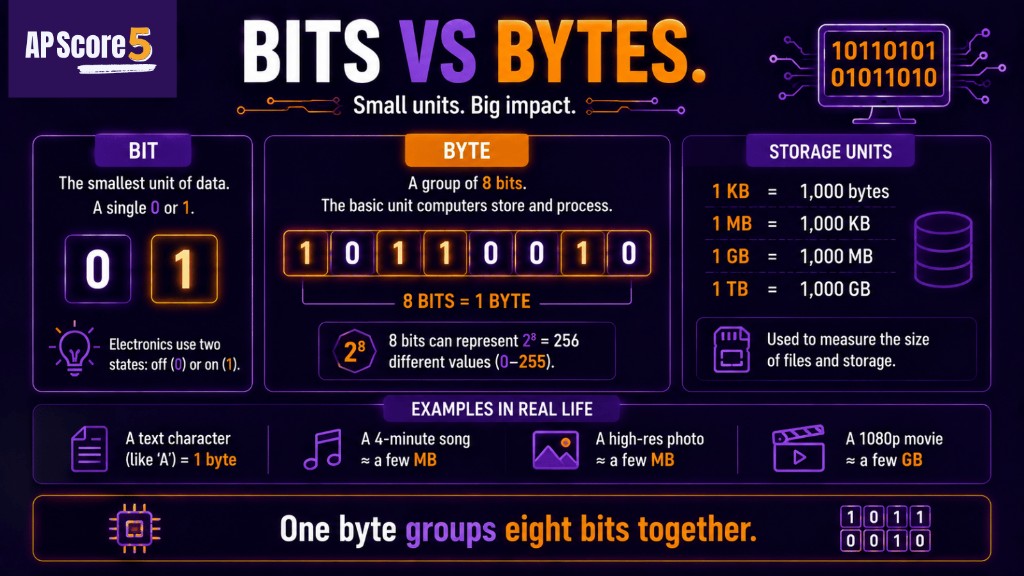
A byte groups eight bits together so computers can store and process larger sets of digital information.
Tiny example: If a file contains 80 bits, that equals 10 bytes because 80 ÷ 8 = 10.
Map the full Unit 2 path on the AP CSP Unit 2 Guide, or review binary numbers first if base-2 place values still feel new.
The most important rule on this page is simple: 1 byte = 8 bits.
| Term | Meaning | AP CSP Example |
|---|---|---|
| Bit | One binary digit | 0 or 1 |
| Byte | 8 bits | 01000001 |
| Bits | Used for low-level representation and network speeds | Mbps |
| Bytes | Used for file size and storage | MB, GB |
| Digital data | Data represented with bits | text, images, audio, files |
A bit has 2 possible values. A byte has 8 bits, so it has 2⁸ possible bit patterns, which equals 256. You do not need to memorize every pattern, but you should remember that a byte stores much more information than a single bit.
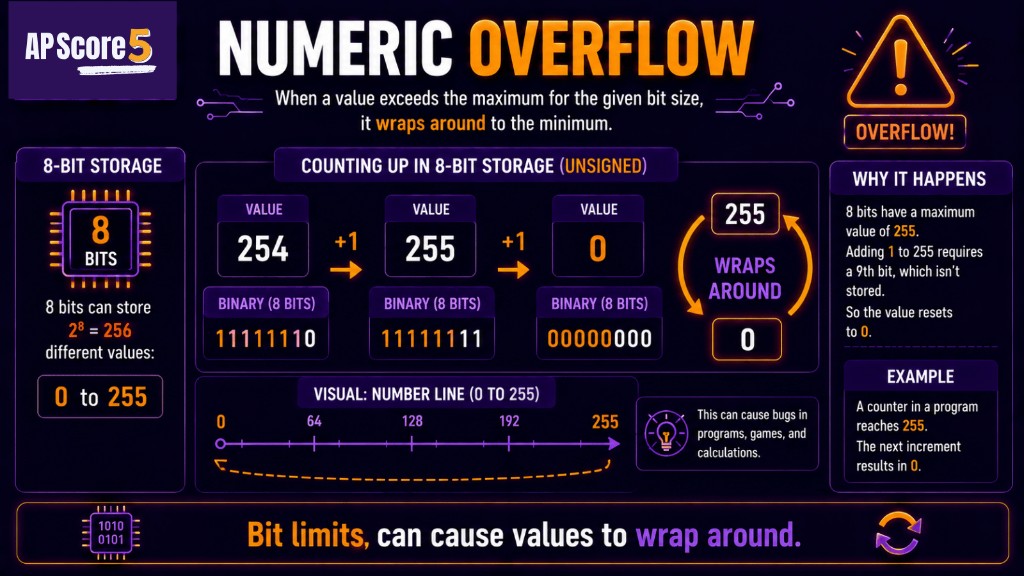
When a value exceeds the maximum for its bit width, the stored number can wrap back to zero.
For the base-2 foundation, review Binary Numbers. For place-value sums, use the binary to decimal conversion guide when stems ask you to read small binary values.
File sizes are usually measured in bytes or larger byte-based units. AP CSP questions often use approximate values so students can reason about size without difficult arithmetic.
| Unit | Approximate Meaning | Common Example |
|---|---|---|
| Byte | 8 bits | one small character in simple examples |
| KB | about 1,000 bytes | short text file |
| MB | about 1,000,000 bytes | photo, song, or PDF |
| GB | about 1,000,000,000 bytes | video or large app |
Operating systems and apps usually show file size in bytes, KB, MB, or GB because bytes are easier to read than long counts of bits. A 5 MB file is easier to understand than saying about 40 million bits.
Mbps and MB look similar, but they are not the same. The lowercase b in Mbps means bits. The uppercase B in MB means bytes.
| Label | Usually Means | Used For |
|---|---|---|
| b | bit | individual binary digit |
| B | byte | 8 bits |
| Mbps | megabits per second | internet speed |
| MB | megabytes | file size |
| GB | gigabytes | storage size |
To compare bits and bytes, use 8 bits = 1 byte. To convert bits to bytes, divide by 8. To convert bytes to bits, multiply by 8.
Examples: 80 bits = 10 bytes. 10 bytes = 80 bits.
AP CSP may ask students to reason about file size, storage, or transfer time. The goal is usually to check whether you understand the unit, not to do complicated math.
| Question Clue | What to Think |
|---|---|
| A file is 4 MB | File size is in megabytes |
| A connection is 40 Mbps | Speed is in megabits per second |
| A file has 80 bits | Divide by 8 to get 10 bytes |
| A file has 10 bytes | Multiply by 8 to get 80 bits |
| A photo is larger than a text file | Images usually need more data than plain text |
Compression can reduce file size, but compression is a separate topic. First understand bits and bytes; then study how compression reduces the number of bits needed to store data.
Next, review Data Compression.
| Mistake | Correction |
|---|---|
| Thinking bit and byte mean the same thing | A byte is 8 bits |
| Forgetting uppercase B vs lowercase b | B usually means bytes; b usually means bits |
| Using MB for speed | Internet speed is often Mbps, not MB |
| Using Mbps for file size | File size is usually MB or GB |
| Forgetting to divide bits by 8 | bits ÷ 8 = bytes |
| Forgetting to multiply bytes by 8 | bytes × 8 = bits |
| Thinking KB, MB, and GB are bits | They usually refer to bytes in file-size contexts |
| Trying to memorize every storage example | Focus on unit reasoning |
Some classes use ASCII as an example of how text can be stored using bytes, but this page’s main focus is bit vs byte and file-size reasoning.
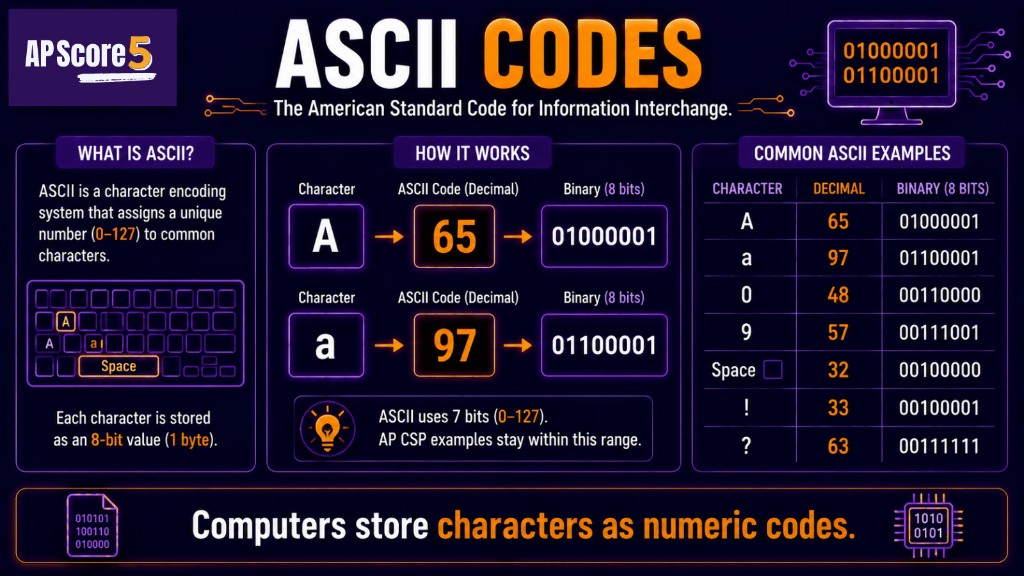
Computers store text by converting characters into numeric codes such as ASCII values.
AP CSP bits-and-bytes questions usually check whether students can identify the correct unit and convert between bits and bytes.
| Question Type | What to Do |
|---|---|
| Define bit | One binary digit, 0 or 1 |
| Define byte | 8 bits |
| Convert bits to bytes | Divide by 8 |
| Convert bytes to bits | Multiply by 8 |
| Identify file-size unit | Look for KB, MB, GB |
| Identify network-speed unit | Look for Mbps or bits per second |
| Avoid unit trap | Check uppercase B vs lowercase b |
Try the Unit 2 quiz or the 50-question practice set after this page.
These are short topic checks. For full mixed Unit 2 practice, use the 50-question practice page. Tap an answer to reveal the explanation. Choices shuffle on load.
One bit can store:
Q1Explanation: A bit is one binary digit, either 0 or 1.
One byte equals:
Q2Explanation: A byte is 8 bits.
How many bytes are in 80 bits?
Q3Explanation: Divide bits by 8. 80 ÷ 8 = 10 bytes.
How many bits are in 12 bytes?
Q4Explanation: Multiply bytes by 8. 12 × 8 = 96 bits.
Which label usually refers to file size?
Q5Explanation: MB means megabytes and is commonly used for file size.
Which label usually refers to internet speed?
Q6Explanation: Mbps means megabits per second and is commonly used for network speed.
A 5 MB file is best described as:
Q7Explanation: MB means megabytes, which are byte-based file-size units.
Which statement is true?
Q8Explanation: A byte is 8 bits.
A student sees "40 Mbps" for internet speed. What does the lowercase b mean?
Q9Explanation: Lowercase b usually means bits.
A student sees "40 MB" for a file. What does the uppercase B mean?
Q10Explanation: Uppercase B usually means bytes.
Which conversion is correct?
Q11Explanation: The core conversion is 1 byte = 8 bits.
Why should students label units before solving AP CSP storage questions?
Q12Explanation: Many mistakes happen because students confuse bits, bytes, Mbps, and MB.
Check each skill when you can explain it without looking at notes.
0 of 8 ready
A bit is one binary digit. It can have one of two values: 0 or 1.
A byte is a group of 8 bits. Bytes are commonly used to measure file size and storage.
There are 8 bits in 1 byte. This is one of the most important AP CSP Unit 2 facts to memorize.
A bit is one 0 or 1. A byte is 8 bits. Bits are often used when talking about low-level representation or network speed, while bytes are commonly used for file size and storage.
To convert bits to bytes, divide the number of bits by 8. For example, 80 bits equals 10 bytes.
To convert bytes to bits, multiply the number of bytes by 8. For example, 10 bytes equals 80 bits.
Mbps means megabits per second and is usually used for internet speed. MB means megabytes and is usually used for file size. They are not the same because 1 byte equals 8 bits.
In file-size contexts, KB, MB, and GB usually refer to byte-based units: kilobytes, megabytes, and gigabytes.
The biggest mistake is confusing bits and bytes, especially lowercase b for bits and uppercase B for bytes.
After bits and bytes, study binary-to-decimal conversion and data compression. Those pages build on the idea that digital data is stored using bits and bytes.